
The Problem That Led Me to Test These Tools
You’re staring at a product photo that’s blurry. Or a listing picture cluttered with stuff you don’t want in the shot. Or a poster where the text got cut off. And you think: “I really need a designer right now.”
I’ve been there too. That’s exactly why I tested two of the most popular AI image editors myself ChatGPT and Gemini instead of just reading reviews online.
I ran the same prompts through both tools. I compared what they actually produced. And this guide covers what I really found, step by step.
If you’re trying to figure out which tool works best for real-world editing tasks, you’re going to get the honest answer from someone who tested it firsthand.
What Exactly Is an AI Image Editor?
An AI image editor is software that uses artificial intelligence to change, create, or improve photos based on what you write.
Instead of clicking through menus and filters like you’d do in Photoshop, you just describe what you want. “Remove the background.” “Make it brighter.” “Add a logo here.” The AI does the rest.
It’s fast, it doesn’t require design skills, and it works from your browser or phone. That’s why so many people outside the design world are using it now.
Who’s Actually Using These Tools (And Why)
Real estate agents use AI image editors to polish listing photos fast. HR teams use them to create graphics for job postings. Small business owners use them because they don’t have a designer on staff.
Here’s what I’ve noticed: people who save the most time are ones who don’t have design training.
They’re not fighting with software they’re just describing what they need. And they get professional-looking results without spending an hour learning complicated tools.
What makes AI image editors valuable:
- Consistent, professional results every time
- Takes minutes instead of hours
- No design experience needed
- Works on your phone or computer
How I Tested ChatGPT vs Gemini (So You Know This Is Real)
Before I show you the results, here’s exactly how I did this test. That way, you can judge the results for yourself instead of just taking my word.
My test setup:
- Tested both tools on their free versions only
- Used 3 real-world tasks with 1 prompt each
- Generated 6 images total plus 1 original “before” photo for editing
- Tested on: text inside images, realistic photos, and precise photo editing
The exact prompts I used:
- “Create a poster for a local bakery grand opening, with the text ‘Grand Opening – 20% Off’ clearly visible at the top.”
- “Generate a realistic photo of a person holding a coffee cup in natural morning light, no text.”
- Uploaded my own photo and typed: “Remove only the jasmine flower from the image without changing anything else.”
Now let’s look at what actually happened.
Test Results: Which Tool Actually Performs Better?
Task 1: Adding Text to Images (Posters, Memes, Labels)
This one surprised me. Neither tool nailed it completely.
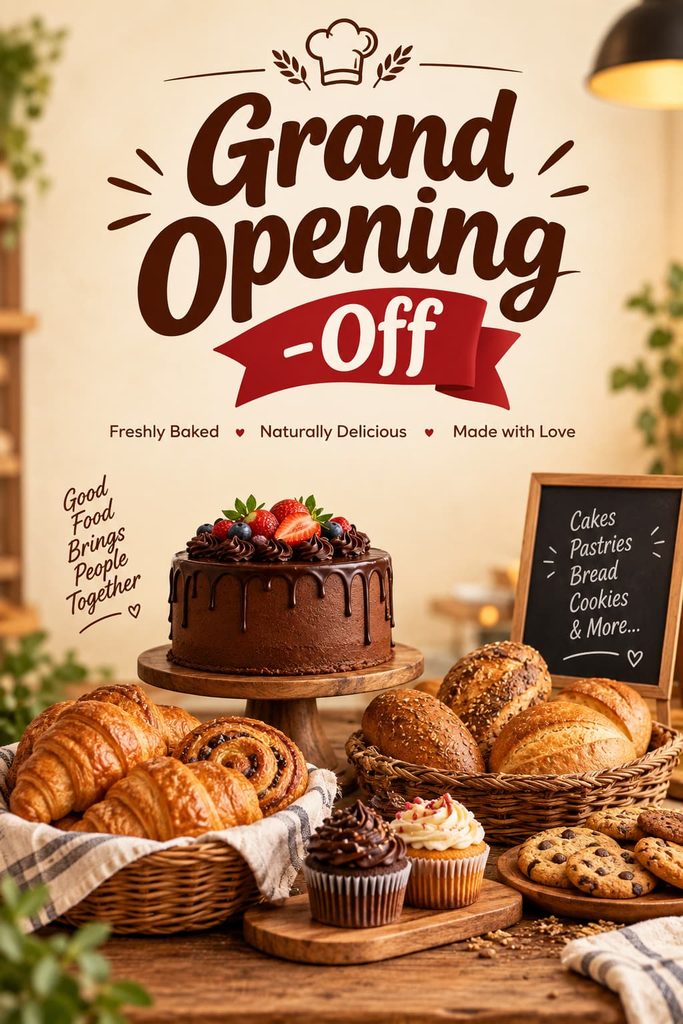

ChatGPT’s result: The poster looked genuinely realistic. The bakery spread was beautifully arranged and looked like a real photo, not a cartoon. But here’s the problem it cut off the discount. The banner showed “-Off” instead of “20% Off.” So it failed at the one thing I specifically asked for.
Gemini’s result: The text was fully spelled out and easy to read. But it changed “20% Off” to “50% OFF” without asking. Then it got creative and added stuff I never asked for: a bakery name, an address, a date, and an Instagram handle. And the whole thing looked like a flat, illustrated graphic, not a photo.
What I learned: For text accuracy, neither tool is perfect. ChatGPT gets closer to what you ask for but can drop important details. Gemini looks more finished but assumes you want it to add extra stuff.
Task 2: Realistic Photos (People, Products, Lighting)
Both tools did well here. Really well, actually.


ChatGPT’s result: I got a candid, phone-photo-style shot. A hand holding a chai cup by a window with natural morning light. No face shown, very realistic. It felt like something you’d actually see on a regular day.
Gemini’s result: This one was more polished. It showed a fuller portrait with a smiling face and palm trees in the background. The lighting looked professional. But it took a liberty it printed text on the mug itself that I never asked for.
What I learned: For realistic photos, both tools are strong. The difference is that ChatGPT stays simple and natural, while Gemini adds polish but also adds things you didn’t ask for.
Task 3: Editing Without Changing Everything Else
This is where precision matters. I uploaded a photo with jasmine flowers pinned in the hair and asked both tools to remove just the flowers nothing else.

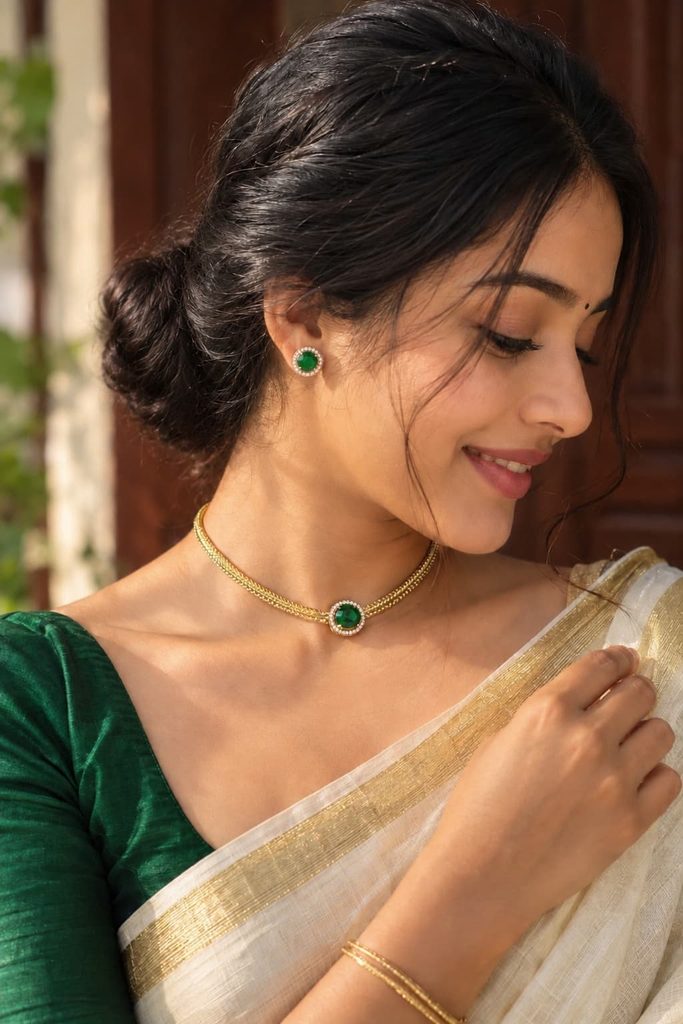

ChatGPT’s result: Clean. The hair stayed exactly the same. The jewelry stayed. The saree stayed. Only the flowers were gone.
Gemini’s result: The flowers came out okay. But then Gemini added a small sparkle or shine graphic near the shoulder that wasn’t in the original photo at all.
What I learned: For precise edits, ChatGPT is more reliable. It does what you ask. Gemini tends to add decorative touches you didn’t request.
For the full breakdown with more test prompts and screenshots, I wrote a dedicated ChatGPT vs Gemini deep dive that walks through additional test cases.
ChatGPT vs Gemini: The Honest Comparison
| Feature | ChatGPT | Gemini | What This Means |
|---|---|---|---|
| Text inside images | Weak | Average | ChatGPT cut off the discount; Gemini changed it and added extra info |
| Realistic photos | Strong | Strong | Both looked convincing; Gemini added text you didn’t ask for |
| Precise edits | Strong | Average | ChatGPT removed the flower cleanly; Gemini added a stray sparkle |
| Easy for beginners | High | High | Both work with plain instructions on the free tier |
| Best for | Accuracy | Finished look | Choose based on what matters more to you |
What to Actually Use These Tools For
AI image editors work best for specific tasks. Here’s what actually works:
Remove objects from photos Delete an unwanted person, pet, or thing without leaving traces. This is where both tools are strongest.
Add elements naturally Drop in a logo or object that blends with the background. Both tools can do this if you’re specific about placement.
Change backgrounds Swap a cluttered room for a clean studio setup. Both handle this well for professional-looking results.
Improve quality Sharpen blurry photos, brighten dark ones, or upscale small images to larger sizes.
Create social media graphics Make posters, promotional images, or thumbnails from scratch using text prompts.
If you work with a lot of photos like wedding photographers culling thousands of images these tools become real time-savers.
If your work involves other kinds of visual generation, the same “test before you trust” approach applies. Architecture firms, for example, use AI rendering tools to compare outputs on the same floor plan before picking one.
How to Use an AI Image Editor (Step by Step)
- Open ChatGPT or Gemini in your browser
- Upload your image (if editing) or just type your prompt (if creating)
- Describe exactly what you want: remove, add, change, or improve
- Wait a few seconds for the AI to process
- Look at the result closely
- Download the image or ask for changes
- Double-check against the original (important!)
That’s it. Simple and fast.
Tips to Get Better Results (What Actually Worked for Me)
Be specific, not vague. “Remove only the jasmine flower from the hair” worked way better than “clean up the photo.” The more details you give, the better the result.
Always double-check numbers and exact text. Both tools changed the discount percentage in my test. If numbers, prices, or specific wording matter, verify them before using the image anywhere public.
Review the whole image, not just the edited part. I almost missed the sparkle graphic Gemini added because I only looked at where the flowers were removed. Always compare the full edited image against the original side by side.
Describe what you DON’T want, too. If you’re picky about certain things, say it: “Remove the dog but keep the carpet exactly as is.” This gives the tool boundaries.
Common Mistakes People Make (And How to Avoid Them)
Mistake 1: Assuming the tool won’t add anything extra
Both tools added things I didn’t ask for in my test. Gemini added a fake bakery name and address. It added text on a mug. It added sparkles. Don’t assume the AI will only do what you asked it might try to be helpful by adding extra details.
Mistake 2: Not comparing the edited image to the original
Small changes are easy to miss if you’re just looking at the final result. Always put the original and edited version side by side.
Mistake 3: Trusting one test as proof
A single run isn’t proof of how a tool always performs. These are snapshots, not guarantees. One day Gemini might nail your edit perfectly. The next day it might add something weird. Test on your own work before committing to either tool.
Mistake 4: Using generated images without checking the terms
Before you publish or sell an image, check the platform’s usage rights. Some have restrictions on commercial use.
What the Free Tier Actually Gives You
Since I only tested the free versions, here’s what I got:
Both ChatGPT and Gemini let me generate and edit images without paying anything. No paywall appeared for any of my 6 tests.
Neither tool told me I hit a usage limit. That said, if you use these tools heavily every day, you might hit limits that a one-time test like mine wouldn’t show.
For pricing limits and what you get on paid plans, check each platform’s pricing page directly. Those numbers change frequently, so I won’t guess.
What I Actually Learned From Testing Both
After running these tests myself on free tier versions, here’s my honest takeaway:
There’s no single winner. There’s a trade-off.
ChatGPT is more literal. It follows your instructions closely. But it sometimes misses important details like cutting off half your text. Use it when precision matters most.
Gemini fills in the gaps with its own creative choices. The results look more polished and complete. But it sometimes adds things you didn’t ask for. Use it when you want a finished, ready-to-post look.
The real lesson: Test both tools on your own work photos before you commit to one. Always compare the result against the original before you use it anywhere public. The right AI image editor depends on your specific task, not just the brand name.
If you’re editing photos for a real estate listing, you need precision go with ChatGPT. If you’re creating promotional graphics that need to look polished and complete, Gemini might serve you better. But in both cases, double-check the details.
That’s what I learned. Now you know what actually works because I tested it.