You can spend days making a great video and still get no views because of a weak title and an empty description. Titles and descriptions decide whether people click, and they help YouTube understand who to show your video to. This guide shows you how to write YouTube titles and descriptions with AI (ChatGPT, Claude or Gemini), with 15 copy-paste prompts, real examples and the limits YouTube actually enforces.
Who wrote this: I’m a software developer who makes tutorial videos and builds tools for creators. These prompts come from my own uploads and testing. No prompt guarantees views; the video itself has to deliver on the title’s promise.
What YouTube Allows (Quick Reference)
| Element | Limit | What matters |
|---|---|---|
| Title | 100 characters | The first ~60 characters often show on mobile and in search, so front-load the hook and keyword |
| Description | 5,000 characters | The first 1-2 lines show before “more”, so make them count |
| Tags | 500 characters total | Minor ranking factor; mainly helps with misspellings |
| Hashtags | In title or description | The first few from the description can appear near the title. Don’t overdo them |
| Chapters | Timestamps in the description | Start at 0:00, list at least 3 chapters, each at least 10 seconds long |
YouTube’s limits and display rules change from time to time, so check YouTube Help if something looks different in Studio.
What Makes a YouTube Title Get Clicked?
- A clear promise: the viewer knows exactly what they’ll get.
- Curiosity without clickbait: make them want to know more, but deliver it in the video.
- Specifics: numbers, timeframes and results (“in 10 minutes”, “$0 budget”, “after 30 days”).
- The search phrase: for tutorials and how-tos, include the words people type.
- Works with the thumbnail: the title and thumbnail should complement each other, not repeat the same words.
Give the AI Context First
Paste this brief before any prompt below. Better inputs mean far better titles.
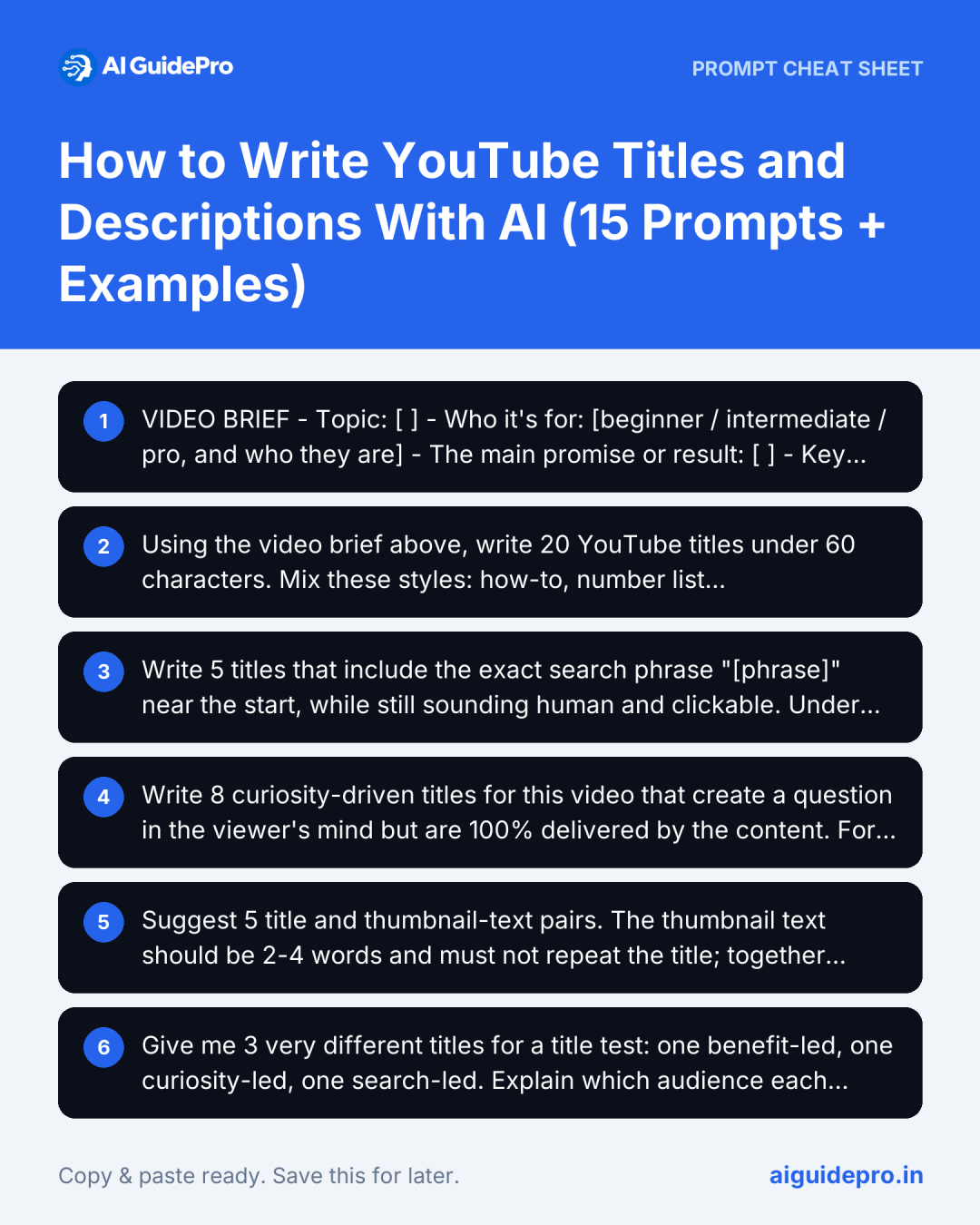
VIDEO BRIEF
- Topic: [ ]
- Who it's for: [beginner / intermediate / pro, and who they are]
- The main promise or result: [ ]
- Key moments or surprises in the video: [ ]
- Search phrase people might use: [ ]
- Video length and format: [tutorial / review / vlog / list / story / Short]
- Thumbnail text (if any): [ ]
- Channel tone: [calm and expert / energetic / funny]
- Transcript or outline (optional): [paste]
Prefer a form? Our Meta Title & Description Generator includes a YouTube title mode, and the Video Script Prompt Generator helps you plan the video itself.
15 AI Prompts for YouTube Titles and Descriptions
Titles
1. 20 Title Ideas in Different Styles
Using the video brief above, write 20 YouTube titles under 60 characters.
Mix these styles: how-to, number list, result/transformation, mistake/warning, question, comparison, personal story.
Put the most important words first. No ALL CAPS, no misleading claims. Mark your top 3 and explain why.
2. Search-Focused Title
Write 5 titles that include the exact search phrase "[phrase]" near the start, while still sounding human and clickable. Under 70 characters.3. Curiosity Title (Without Clickbait)
Write 8 curiosity-driven titles for this video that create a question in the viewer's mind but are 100% delivered by the content. For each, note the moment in the video that pays it off.4. Title + Thumbnail Pairs
Suggest 5 title and thumbnail-text pairs. The thumbnail text should be 2-4 words and must not repeat the title; together they should tell a complete story.5. Title A/B Test Set
Give me 3 very different titles for a title test: one benefit-led, one curiosity-led, one search-led. Explain which audience each targets.Tip: YouTube Studio has rolled out built-in testing for thumbnails and titles on many channels. If it’s available to you, test with real viewers instead of guessing.
6. Improve My Title
My title is: "[title]". Score it 1-10 for clarity, curiosity and search intent, explain the weaknesses, and give 5 improved versions under 60 characters.Descriptions
7. Full SEO Description
Write a YouTube description for this video:
- First 2 lines (under 150 characters): a hook that includes the main search phrase and makes people want to watch
- A 2-3 sentence summary of what viewers will learn
- A chapter list using these timestamps: [paste timestamps and topics]
- Links section placeholders: [resources, related video, newsletter]
- 3 relevant hashtags at the end
Write naturally; don't stuff keywords.
8. Chapters From a Transcript
Here is my video transcript with timestamps: [paste].
Create YouTube chapters: start at 0:00, at least 3 chapters, each at least 10 seconds apart, with short descriptive titles (under 40 characters) that include keywords where natural.
9. Description Opening Lines Only
Write 5 options for the first two lines of my description (under 150 characters total), each including "[search phrase]" and giving a reason to keep watching.10. Summary From a Transcript
Summarise this transcript into a clear 100-word description paragraph that covers the main points in order. Don't invent anything not said in the video. [paste transcript]Shorts, Tags and Extras
11. YouTube Shorts Titles
Write 10 titles for a YouTube Short about [topic], under 40 characters, punchy, with 1-2 relevant hashtags each. Shorts viewers decide in a second, so lead with the hook.12. Tags List
Suggest tags for this video under 500 characters total: the main phrase, 5 close variations, 3 broader topic tags, and common misspellings.13. Pinned Comment
Write a pinned comment that asks viewers a specific question about the video to start discussion, plus one line pointing to a related video. Under 50 words.14. Repurpose for Other Platforms
Turn this YouTube title and description into: an Instagram Reel caption, a TikTok caption with 3 hashtags, and a LinkedIn post intro. [paste]15. Localised Titles
Translate and adapt this title and description for [language] viewers. Keep the hook natural for native speakers rather than translating word for word. [paste]Example: Before and After
| Title | Why | |
|---|---|---|
| Before | My Video About Editing Faster | Vague, no promise, no search phrase |
| After (search) | Edit YouTube Videos 2x Faster: 7 Premiere Pro Tricks | Clear result, number, tool name people search |
| After (curiosity) | The 1 Setting That Cut My Editing Time in Half | Specific curiosity, paid off in the video |
| After (beginner) | Video Editing for Beginners: Fast Workflow Step by Step | Matches beginner search intent |
Description opening (after):
Edit your YouTube videos twice as fast with 7 Premiere Pro tricks I use every week, from proxy files to keyboard shortcuts.

0:00 Why editing takes so long
0:45 Trick 1: Proxy files
2:10 Trick 2: Custom keyboard shortcuts
...
Mistakes to Avoid
- Clickbait the video doesn’t deliver. Viewers leave quickly, which can hurt how widely the video is shown.
- Keyword stuffing. “Editing, video editing, edit video, editing tips…” looks spammy to viewers.
- Copy-pasting AI titles unchanged. AI loves words like “Ultimate”, “Unlock” and “Secrets”. Cut them unless they truly fit.
- Ignoring the first two lines of the description. That’s what most people see.
- Making false claims. Misleading titles and metadata can break YouTube’s spam and deceptive practices policies.
Going further with AI video? See our beginner’s guide to AI script writing for TikTok and Shorts and our pick of free AI video generators.
Frequently Asked Questions
Can ChatGPT write good YouTube titles?
Yes, especially when you give it a detailed brief about the video, the audience and the payoff. Generate many options, then pick and edit the best ones yourself.
How long should a YouTube title be?
YouTube allows 100 characters, but the start of the title matters most because it may be cut off on mobile and in search. Keep the hook and keyword in roughly the first 60 characters.
Do YouTube descriptions help with SEO?
Yes. Descriptions help YouTube and Google understand your video’s topic, and chapters can appear in search results. Write for viewers first and include your main phrase naturally.
Do tags still matter on YouTube?
YouTube says tags play a minimal role in discovery. They’re mainly useful for common misspellings. Your title, thumbnail and description matter much more.
Which AI is best for YouTube titles?
ChatGPT, Claude and Gemini all work well with these prompts. Tools built for creators can add data such as search volume; use them alongside your own judgement.
Final Thoughts
AI can give you 20 title ideas in seconds and a structured, chapter-ready description in a minute. Your job is to choose the one that honestly sells your video and pairs well with your thumbnail. Fill in the brief, start with prompts 1 and 7, test titles when YouTube lets you, and keep a swipe file of the titles that work for your channel.