I gave ChatGPT and Gemini the same image prompts, word for word, and compared what came back side by side. This page covers creating images from scratch. If you want to change a photo you already have, I tested that separately in ChatGPT vs Gemini for photo editing.
- Overall winner: ChatGPT, because it changed less of what I asked for.
- Natural, candid photos: ChatGPT
- Polished, ready-to-post graphics: Gemini
- Exact text in an image (prices, offers, names): neither. Both got my offer wrong, so check every character.
- You work in Google Docs, Slides and Gmail: Gemini
Tested in September 2026 on the free tiers of both tools.
Which Models You’re Actually Comparing (October 2026)
Both products have changed their image models and plan names more than once, so older comparisons often name tools that no longer exist.
- ChatGPT creates images with OpenAI’s own image model, now called ChatGPT Images 2.5 (GPT Image 2.5 in the API). ChatGPT stopped using DALL·E in 2025, when image generation moved into GPT-4o. I cover the current version in detail in I Tested ChatGPT Images 2.5.
- Gemini uses Google’s Nano Banana image models. Free users get Nano Banana 2. The Google AI Plus, Google AI Pro and Google AI Ultra plans get Nano Banana 2.1, and you can redo an image with Nano Banana Pro. Google AI Pro is the plan that used to be called Gemini Advanced.
| ChatGPT | Gemini | |
|---|---|---|
| Image model | ChatGPT Images 2.5 | Nano Banana 2 (free), Nano Banana 2.1 (paid) |
| Free tier | Yes, with limits | Yes, with limits |
| Paid plans | Higher limits (check current pricing) | Google AI Plus, Pro, Ultra (check current pricing) |
| Edit by chatting | Yes | Yes |
| Built into Google Workspace | No | Yes (Docs, Slides, Gmail) |
Prices and limits change often, so I link to each pricing page instead of quoting figures that may be out of date by the time you read this.
How I Tested
- When: September 2026, free tier of each tool, logged in, default settings.
- How: the same prompt pasted into both tools once, and I kept the first result. No retries and no follow-up fixes.
- What I judged: did it do what the prompt asked, did it add things I didn’t ask for, does any text match the prompt exactly, and would I publish the image as it is.
That’s a small sample. A single run shows how each tool behaves, not how it behaves every time. I’d still run your own key prompt through both before you pay for either one.
Test 1: A Poster With Text
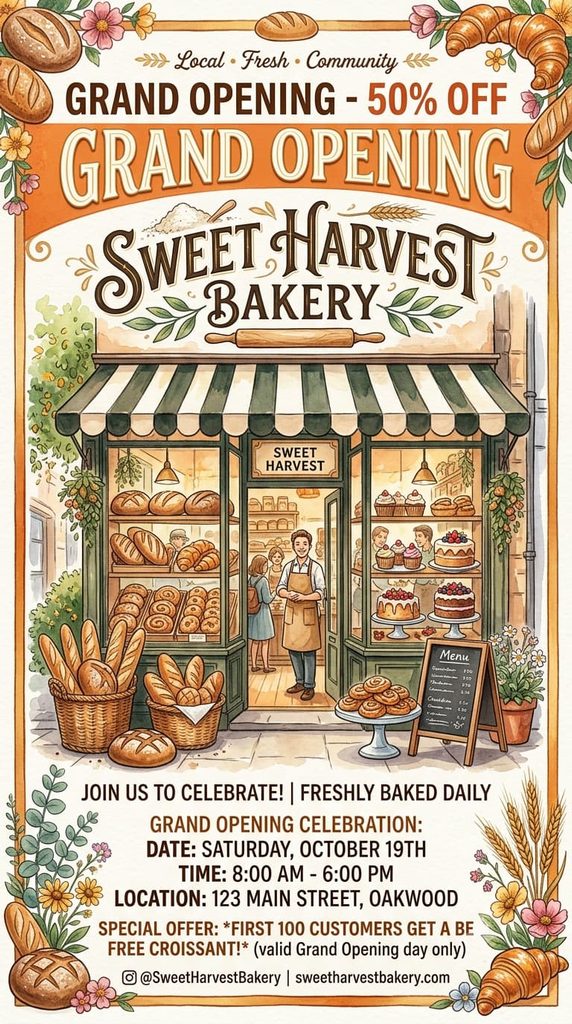
Prompt: “Create a poster for a local bakery grand opening, with the text ‘Grand Opening – 20% Off’ clearly visible at the top.”
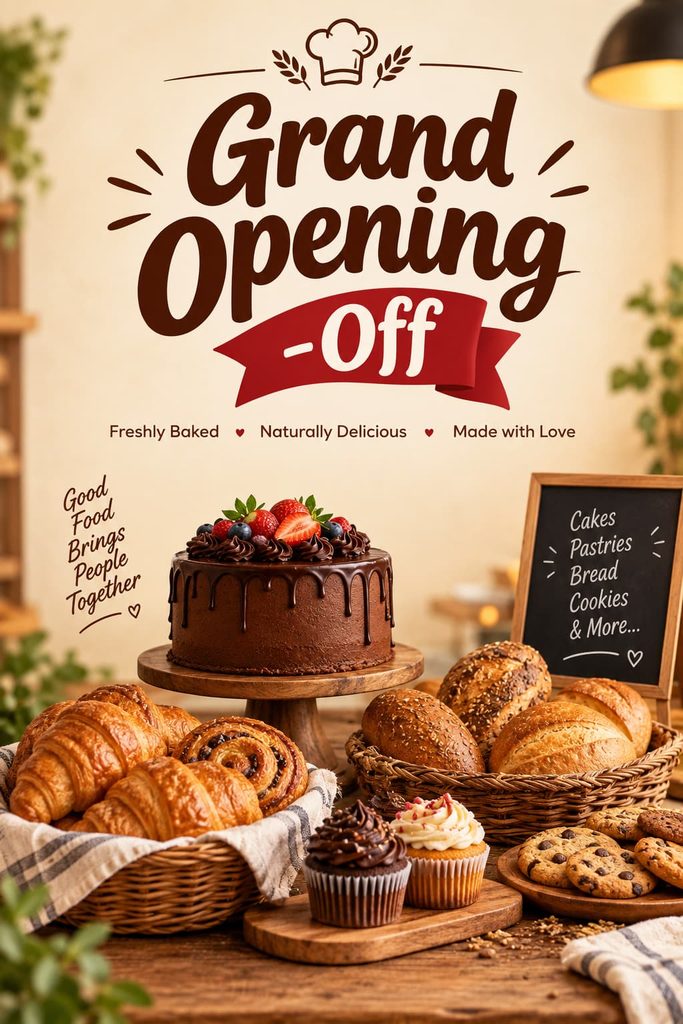
ChatGPT: the bakery scene looks like a real photo, but the headline reads “-Off”. It dropped the “20%”, which was the one piece of text I asked for.
Gemini: the text is complete and easy to read, but it says “50% OFF” instead of 20%. It also made up a bakery name, an address, a date and an Instagram handle, and drew the poster as a flat illustration.
No winner. Neither poster could go out as it is. Gemini’s is closer to finished, but a wrong discount on a real poster is worse than a missing one.
Test 2: A Realistic Photo
Prompt: “Generate a realistic photo of a person holding a coffee cup in natural morning light, no text.”


ChatGPT: a candid, phone-style shot of a hand holding a cup by a window in soft morning light. It’s simple and believable, and it has no text, as asked. One small miss: the cup holds milky tea rather than coffee.
Gemini: a more polished portrait with a smiling face and palm trees behind. The lighting is good, but it printed text on the mug even though the prompt said “no text”.
ChatGPT wins. Both look real, but only ChatGPT followed the “no text” instruction. If you want a styled portrait and don’t mind fixing small details, Gemini’s version looks more professional.
Results at a Glance
| Test | ChatGPT | Gemini | Winner |
|---|---|---|---|
| Poster with exact text | Dropped “20%” | Changed it to “50%”, added made-up details | Neither |
| Realistic photo, no text | Natural, no text; tea instead of coffee | Polished, added text to the mug | ChatGPT |
| Removing one object from a photo (editing test) | Clean, changed nothing else | Added a sparkle that wasn’t there | ChatGPT |
The pattern was the same in every test: ChatGPT is more literal, and Gemini adds things. Sometimes Gemini’s additions make the image look more finished, but they’re also details you didn’t ask for and now have to check.
Which One Should You Use?
You need the image to match your brief → ChatGPT
Use it for product mockups, blog headers or anything a client signed off on in writing. In my tests it stayed closest to the prompt and didn’t invent extra details.
You want a finished-looking social graphic fast → Gemini
Gemini’s output looked more designed straight away. Budget a minute to remove anything it added that you didn’t ask for.
You live in Google Workspace → Gemini
Gemini works inside Docs, Slides and Gmail, so you can make an image where you’re already working instead of downloading and re-uploading it.
Your image must contain exact text → Either, but proofread
Both tools got my 20% offer wrong. For anything with a price, date or name, check every character, or add the text yourself in a design tool afterwards.
Ease of use is a tie. Both work the same way: you describe the image in plain language and ask for changes in the same chat.
Tips That Made a Difference in My Tests
- Say what you don’t want. “No text” worked for ChatGPT but not for Gemini, so say it again in a follow-up if it’s ignored.
- Put exact text in quotes and check it. Both tools changed or dropped the numbers I gave them.
- Look at the whole image, not just your subject. Extra logos, addresses and printed mugs are easy to miss.
- Check the terms before commercial use. Both allow it, but rules on likeness and trademarks still apply to you.
To get a better first result, the free AI Image Prompt Generator builds a detailed prompt you can paste into either tool.
Final Verdict: ChatGPT Wins, Narrowly
For creating images, ChatGPT wins because it does what you asked and changes less. That matters most when the image is for a client, a product page or anything with real details. Gemini is the better pick if you want a polished social graphic quickly or you already work in Google Workspace, as long as you check what it added. Neither tool can be trusted with exact text yet.
Related tests: I Tested ChatGPT Images 2.5 · ChatGPT vs Gemini for photo editing · Best AI image editors in 2026