Introduction
It’s 10 p.m. You still have 40 notebooks to check and tomorrow’s lesson plan to write. Sound familiar?
The good news: the best free AI tools for teachers in India can take a big chunk of that load off your shoulders. If you’re new to this, our guide on AI tools for teachers is a great warm-up. Let’s dive in.
What Are AI Tools for Teachers?
AI tools for teachers are apps that understand your instructions in plain language and produce useful classroom material in seconds. You type a request, like “Make a 10-question quiz on photosynthesis for Class 7,” and the tool writes it for you.
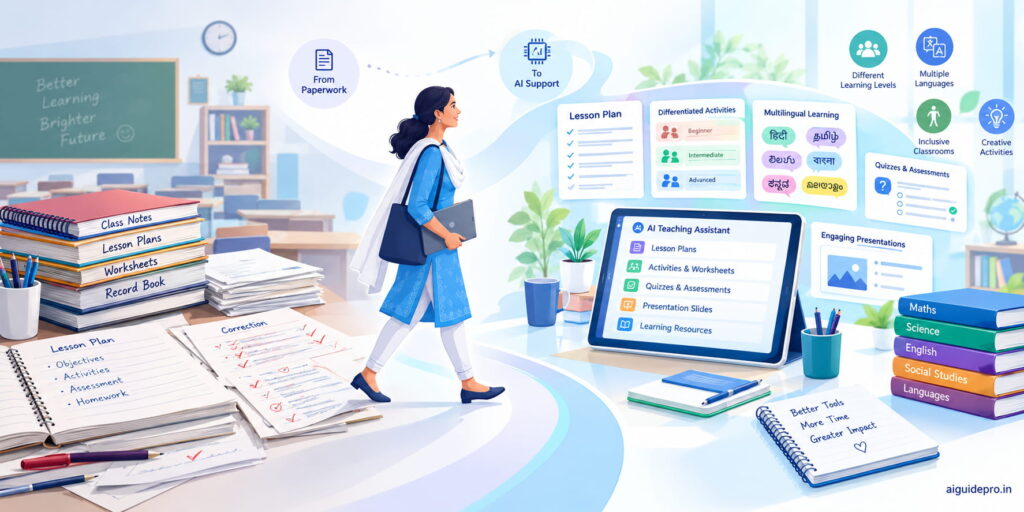
Think of them as a smart assistant who never gets tired. These AI teacher assistants can help you with:
- Lesson planning: objectives, activities and homework ideas
- Content creation: worksheets, slides, stories and examples
- Assessment: quizzes, answer keys and rubrics
- Admin work: parent messages, circulars and report card remarks
They don’t replace your judgment. They give you a strong first draft so you can spend your energy on what matters most: your students.
Why Indian Teachers Need AI in 2026
Indian classrooms run at a scale few countries can match. The UDISE+ 2024-25 report shows India crossed 1 crore teachers for the first time, serving about 24.69 crore students.
That’s a lot of lesson plans, notebooks and report cards. And the workload doesn’t stop at teaching. Many teachers also handle surveys, data entry, election duty and endless WhatsApp groups.
Then there’s the policy push. In an April 9, 2026 notice, CBSE introduced a Computational Thinking and AI curriculum for Classes 3 to 8 from the 2026-27 session. It also made “Computational Thinking and Understanding AI” the teacher training theme for the year.
In simple terms, AI is no longer optional knowledge. Your students will learn about it. Parents will ask about it. And your school may expect you to use it.
Here’s the hopeful part. You don’t need a big budget to start. Free tools can already:
- Cut your planning time from hours to minutes
- Help you teach mixed-ability classes better
- Translate material into your students’ home language
Image idea: A teacher in a busy Indian classroom using a phone to plan the next lesson.
Benefits of Free AI Tools for Teachers
Before we get to the list, let’s look at what you actually gain. These are the five benefits teachers mention most.
Save Time on Daily Tasks
This is the big one. A worksheet that took 45 minutes now takes five. A parent message that you rewrote three times comes out right on the first try.
AI writing assistants handle circulars, instructions and report card remarks well. You get your evenings back.
Personalize Learning for Each Student
Every class has fast learners, slow learners and everyone in between. AI makes it easy to create three versions of the same worksheet: basic, standard and challenge.
You can also ask for extra practice for one weak topic. It’s like having a tutor for every child, minus the fees.
Teach in Indian Languages
Many students think in Malayalam, Tamil or Hindi, even in English-medium schools. AI tools can translate notes, simplify hard words and explain concepts in the home language.
A Class 5 science lesson becomes far easier when a child hears it in the language they speak at home.
Make Lessons More Engaging
Students remember stories, games and pictures far better than plain notes. AI can turn the water cycle into a short story or a fractions chapter into a cricket-themed quiz.
It can also build slides, puzzles and role-plays. Your class stops looking at the clock.
No Cost for Schools or Teachers
Most schools in India don’t have budgets for paid software. That’s why free AI tools for teachers matter so much.
Every tool in this guide has a free plan you can use today. All you need is a phone, an internet connection and a Google or Microsoft account.
How We Picked These Tools
There are hundreds of AI apps out there. Most aren’t built for an Indian teacher with a mid-range phone and 40 students. So we judged every tool on five simple tests.
Free Plan That Is Useful
A “free trial” that ends in seven days doesn’t count. We only picked tools whose free plan lets you do real work every week, like planning lessons or making quizzes, without paying.
Support for Hindi and Regional Languages
India has 22 scheduled languages. We gave extra points to tools that understand or produce Hindi, Tamil, Bengali, Malayalam and other Indian languages, not just English.
Easy for Beginners
If a tool needs a tutorial to start, most busy teachers will quit. Every pick here works by typing a simple request or tapping a few buttons.
Works Well on Mobile
Most Indian teachers do their prep on a phone, often on the bus or late at night. We chose tools with good mobile apps or sites that work smoothly in a phone browser.
Safe for Student Data
We looked for clear privacy policies and education-friendly settings. Even so, never type a student’s full name, phone number or Aadhaar details into any AI tool.
Best Free AI Tools for Teachers in India
Here’s the main event. We’ve grouped the best AI tools for teachers by the job they do, so you can jump straight to what you need.
Lesson Planning Tools
Lesson planning eats more teacher time than almost anything else. These three tools turn a topic and a grade into a full plan in under a minute. If you’re torn between the two big names, our ChatGPT vs Gemini comparison breaks down how they differ.
ChatGPT
ChatGPT is the all-rounder. Ask for a 40-minute lesson plan on “Our Constitution” for Class 8, and you’ll get objectives, an opening activity, discussion questions and homework.
The free plan works well for daily planning and understands Hindi, Tamil, Bengali and other Indian languages. OpenAI also ran a 12-month free ChatGPT Go offer for Indian users from November 2025, which gave higher limits and file uploads. Check the app to see what your account has today.
Best for: Lesson plans, explanations, stories and parent messages.
Website: chatgpt.com
Google Gemini
Gemini is Google’s free AI assistant, and it fits neatly into the tools many schools already use. You can send a plan straight to Google Docs or draft a rubric in Sheets.
It handles Hindi and several regional languages and works well on Android phones, since it’s built into many of them.
Best for: Teachers who live in Gmail, Docs and Google Classroom.
Website: gemini.google.com
Pro Tip: Ask Gemini to “include one activity using local examples from Kerala” (or your state). The plan instantly feels more relatable.
MagicSchool AI
MagicSchool is built only for teachers. Instead of a blank chat box, you get 80+ ready-made tools like a Lesson Plan Generator, Rubric Generator and Worksheet Generator.
You just fill in the grade, topic and goal. The free plan has no expiry date, though it doesn’t export directly to Google Docs or Word. Copy-paste works fine.
Best for: Beginners who don’t want to write prompts.
Website: magicschool.ai
Quiz and Assessment Tools
Quick checks tell you who understood the lesson and who didn’t. These two tools make that painless.
Wayground (formerly Quizizz)
If you used Quizizz before, you already know Wayground. The company renamed itself in June 2025 as it grew beyond quizzes. Your old login and quizzes still work.
Upload a PDF, a YouTube video or a chapter’s text, and its AI turns it into a quiz in seconds. Students join with a code on any phone and see a leaderboard, which makes revision feel like a game.
Wayground also offers AI translation, difficulty adjustment and read-aloud. That helps a lot in mixed-ability classes.
Best for: Fun, game-style revision and instant class reports.
Free plan: Yes, for individual teachers. Paid school plans add deeper reports.
Website: wayground.com
Google Forms with Gemini
Google Forms is the quiet workhorse of Indian schools. It’s free, works on any phone and auto-grades multiple-choice answers.
In July 2026, Google added quiz generation with Gemini through the “Help me create” button. You describe the quiz or point to a PDF in Drive, and it builds questions with correct answers.
One catch: this built-in feature needs Workspace for Education Plus, a Google AI Pro plan or similar. On a free account, use this easy workaround:
- Ask the free Gemini app for 10 MCQs with answers.
- Paste them into a new Google Form.
- Turn on “Make this a quiz” and set the answer key.
Best for: Unit tests, homework checks and auto-graded quizzes.
Website: forms.google.com
Presentation and Design Tools
Students remember what they see. These tools help you build slides and visuals that look professional, even if you’ve never studied design.
Canva Magic Studio
Canva is already a favourite in Indian staff rooms. The good part: Canva Education is 100% free for verified teachers and their students. That unlocks Pro features and Magic Studio, its set of AI tools.
With Magic Write, you can draft text for a worksheet. With Magic Design, you type a topic and get a full slide deck. You also get thousands of ready templates for posters, certificates and lesson slides.
To get access, sign up and complete teacher verification using your school ID or email. Note that some Magic Studio features have limits on education accounts.
Best for: Worksheets, posters, classroom displays and slides.
Website: canva.com/education
Image idea: A before-and-after of a plain text worksheet turned into a colourful Canva design.
Gamma
Gamma turns a short prompt or your notes into a full presentation, complete with layout and images. Type “Causes of the Revolt of 1857 for Class 8, 8 slides,” and you get a clean deck to present or share as a link.
The free plan gives 400 one-time AI credits. A full AI deck costs about 40 credits, so that’s roughly 10 presentations. Free decks also carry a “Made with Gamma” label.
Best for: Fast presentations for special lessons or school events. Save credits for the topics that matter most.
Website: gamma.app
Research and Notes Tools
These tools help you understand content deeply and turn long chapters into teaching material.
Google NotebookLM (now Gemini Notebook)
Google renamed NotebookLM to Gemini Notebook in July 2026. The tool works the same way.
You upload your own sources, like a textbook chapter, a PDF or a YouTube link. It then answers questions using only those sources, so it’s less likely to make things up. It can create study guides, flashcards, mind maps and podcast-style audio summaries.
The free plan allows 50 sources per notebook, which is plenty for one subject.
Best for: Chapter summaries, revision guides and question banks from your syllabus.
Website: notebooklm.google.com
Microsoft Copilot
Copilot is Microsoft’s free AI assistant. It works in a browser, in its own phone app, and on Windows computers that many school labs already have.
It can draft lesson plans, explain concepts, write emails and create images for your slides. It also answers in Hindi and other Indian languages.
Best for: Schools that use Microsoft accounts, Word and PowerPoint.
Website: copilot.microsoft.com
Indian Language and Reading Tools
This is where Indian tools truly shine. They’re built for our languages, our textbooks and our students.
Bhashini
Bhashini is the Government of India’s language AI mission, run under MeitY. Its free app supports text translation in 22 Indian languages, plus voice features in 13 languages.
You can type or speak a sentence in English and get it in Odia, Kannada or Assamese. You can also turn your voice into text, which saves typing.
Best for: Translating notices, notes and short explanations for students and parents.
Website: bhashini.gov.in
Google Read Along
Read Along began in India as “Bolo” in 2019. It’s a free reading app for children aged 5 and up, with a friendly reading buddy named Diya.
Children read stories aloud. Diya listens, praises correct reading and helps with hard words. It supports Hindi, Marathi, Bengali, Tamil, Telugu, Gujarati, Urdu and English, has no ads, and works offline after the first download.
Best for: Foundational literacy in Classes 1 to 5, at school and at home.
Website: readalong.google
DIKSHA
DIKSHA is NCERT’s national platform for school education, and it’s completely free. Scan the QR code in an NCERT textbook, and you get videos, worksheets and explanations for that chapter.
As of June 2026, it hosted more than 3.67 lakh pieces of content across 135 languages. Its app now includes an AI helper called “Ask DIKSHA” and teacher training courses with certificates.
Best for: Curriculum-aligned content and free teacher training.
Website: diksha.gov.in
Comparison Table of All Tools
Here’s a quick snapshot of all 12 free AI tools for teachers side by side. Use it to shortlist two or three that fit your needs.
| Tool | Best for | Free plan | Indian languages | Mobile app |
| ChatGPT | Lesson plans, explanations | Yes, with daily limits | Yes, many | Yes |
| Google Gemini | Planning in Google apps | Yes | Yes, many | Yes |
| MagicSchool AI | Ready-made teacher tools | Yes, no expiry | Limited | Web on phone |
| Wayground | Game-style quizzes | Yes, for teachers | Translation feature | Yes |
| Google Forms + Gemini | Auto-graded tests | Forms free; AI quiz builder on select plans | Yes | Web on phone |
| Canva Magic Studio | Worksheets, slides, posters | Free for verified teachers | Yes, several | Yes |
| Gamma | Quick presentations | 400 one-time credits | Yes, several | Web on phone |
| NotebookLM / Gemini Notebook | Summaries from your sources | Yes, 50 sources per notebook | Yes, several | Yes |
| Microsoft Copilot | Planning in Microsoft apps | Yes | Yes, several | Yes |
| Bhashini | Translation and voice | Fully free | 22 for text | Yes |
| Google Read Along | Early reading practice | Fully free | 7 Indian languages | Yes, works offline |
| DIKSHA | NCERT content and training | Fully free | 135 languages | Yes |
A simple way to read this table: pick one planning tool (ChatGPT, Gemini or MagicSchool), one quiz tool (Wayground or Forms) and one language tool (Bhashini, Read Along or DIKSHA). That trio covers most of a teacher’s weekly prep.
Tip: Free plans change often. Check each tool’s pricing page once a term so a limit doesn’t surprise you mid-lesson.
How to Choose the Right AI Tool
Twelve tools can feel like a buffet with too many dishes. You don’t need to taste everything. Use these five steps to find your perfect match.
List Your Biggest Time-Wasters
Grab a notebook and write down the three tasks that eat most of your week. Is it lesson plans? Correcting tests? Writing remarks?
Your list tells you where to start. If quizzes drain you, begin with Wayground, not a presentation tool.
Match the Tool to Your Subject and Grade
A Class 2 Hindi teacher and a Class 11 Physics teacher need different help. Primary teachers will love Read Along and Canva.
Senior teachers often get more from ChatGPT, Gemini Notebook and Gamma, which handle detailed content well.
Check Language Support
If you teach in Marathi, Tamil or Malayalam, test the tool in that language before you commit. Type one paragraph and read the result carefully.
Some tools write fluent Hindi but stumble in smaller languages. Bhashini and DIKSHA are usually the safest bets for regional content.
Test the Free Plan Limits
Use the tool for one full week of real work. Note when you hit a wall, like a daily message cap or used-up credits.
If the limit blocks you every day, switch tools. If you hit it once a month, the free plan is perfect.
Start With One Tool First
Here’s the most common mistake: signing up for six tools on day one and mastering none.
Pick one tool. Use it daily for two weeks until it feels natural. Then add a second. Slow and steady wins here.
How to Use AI in Your Classroom
Picked your first tool? Great. Now let’s walk through how to actually use it, from sign-up to the classroom. Think of it like learning to ride a scooter: wobbly for a day, then second nature.
Create a Free Account
Most tools let you sign up with your Google or Microsoft account in under a minute. Use your school email if you have one, since some tools give teachers extra features.
For Canva, finish the teacher verification step. It unlocks the free Education plan.
Write a Clear Prompt
A prompt is simply your instruction to the AI. The clearer it is, the better the result. A vague prompt like “make a quiz” gives a vague quiz.
Use this simple formula: Role + Task + Grade + Board + Format.
For example: “You are a Class 6 CBSE science teacher. Create 10 MCQs on ‘Components of Food’ with answers, in simple English.”
That one sentence does more work than five back-and-forth messages.
Review and Edit the Output
Never copy AI output straight to the board. Read every line like you’re checking a student’s answer sheet.
Look for wrong facts, odd examples and questions with two correct answers. AI sometimes mixes up dates, formulas or syllabus details.
Fix what’s wrong and remove what doesn’t fit. Five minutes of review turns a decent draft into a lesson you’re proud of.
Adapt It for Your Students
You know your class better than any AI ever will. Maybe Ravi needs bigger fonts, or half the class struggles with English.
Ask the AI to adjust: “Rewrite this for students who find English difficult” or “Add a Hindi explanation for each term.”
Swap in local examples too. A maths problem about buying jackfruit at the market will land better than one about bagels.
Share and Collect Feedback
Share the material through Google Classroom, WhatsApp or a printout. Then watch how students respond.
Did they finish the worksheet too fast? Were the quiz questions confusing? Ask two or three students what they liked and didn’t.
Use that feedback to tweak your next prompt. Each round, the results get a little better.
Ready-to-Use AI Prompts for Teachers
Staring at a blank chat box is the hardest part. So here are copy-and-paste prompts that work in ChatGPT, Gemini, Copilot or any similar tool. Just swap the words in [brackets].
Callout idea: Put these prompts in a shaded box with a “Copy” button so readers can grab them on mobile.
Prompts for Lesson Plans
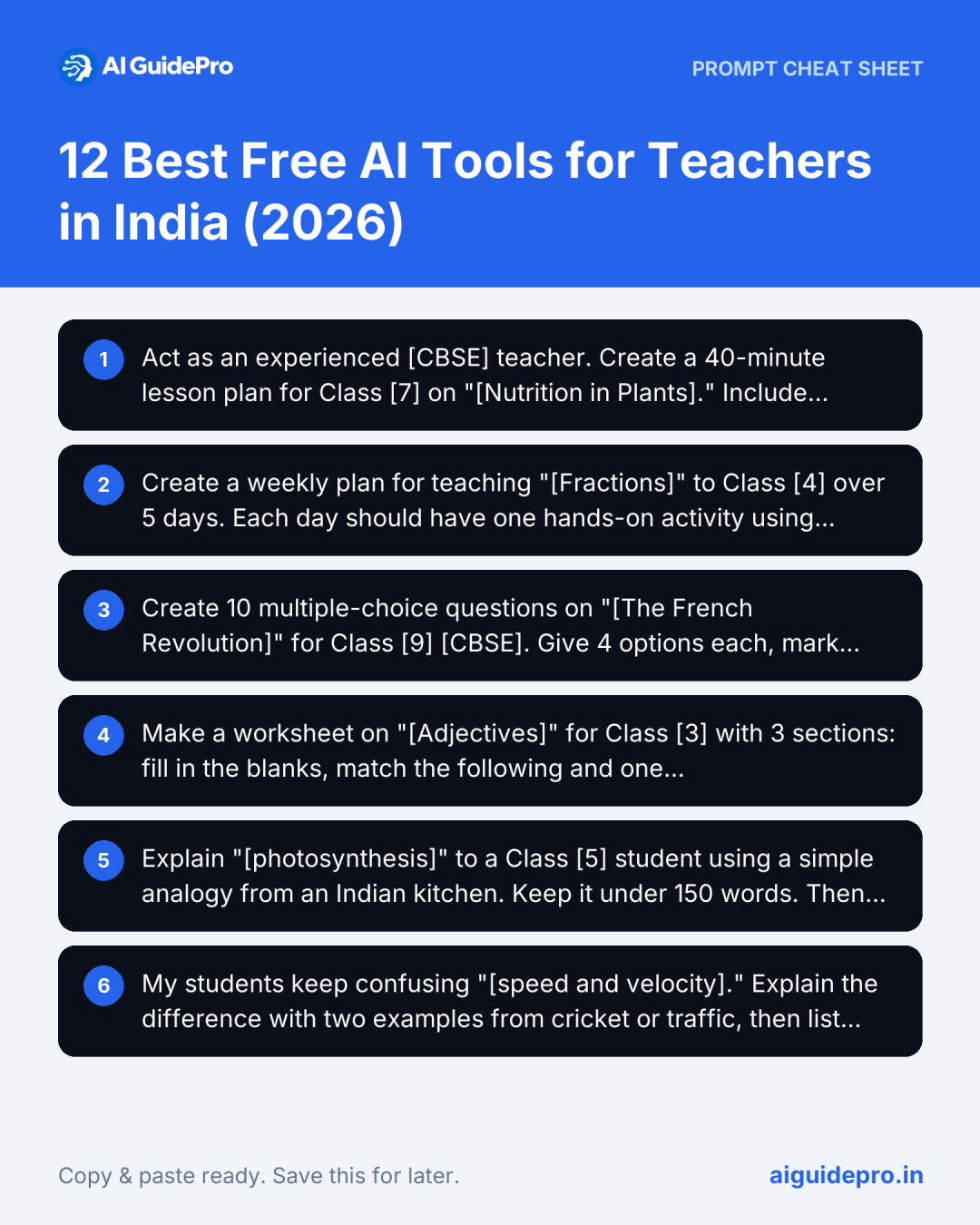
Act as an experienced [CBSE] teacher. Create a 40-minute lesson plan for Class [7] on “[Nutrition in Plants].” Include learning objectives, a 5-minute warm-up, main activity, one group task, a quick exit question and homework. Use simple English and one example from daily life in India.
Create a weekly plan for teaching “[Fractions]” to Class [4] over 5 days. Each day should have one hands-on activity using low-cost classroom materials.
Prompts for Quizzes and Worksheets
Create 10 multiple-choice questions on “[The French Revolution]” for Class [9] [CBSE]. Give 4 options each, mark the correct answer and add a one-line explanation. Mix easy, medium and hard questions.
Make a worksheet on “[Adjectives]” for Class [3] with 3 sections: fill in the blanks, match the following and one picture-description task. Add an answer key at the end.
Prompts for Explaining Hard Topics
Explain “[photosynthesis]” to a Class [5] student using a simple analogy from an Indian kitchen. Keep it under 150 words. Then give 3 check-for-understanding questions.
My students keep confusing “[speed and velocity].” Explain the difference with two examples from cricket or traffic, then list the 3 most common mistakes students make.
Prompts for Parent Messages
Write a polite WhatsApp message to parents of Class [6] reminding them about the PTM on [Saturday, 10 a.m.]. Keep it under 60 words. Also give a Hindi version.
Draft a kind but honest message to a parent whose child has missed homework 4 times this month. Suggest a short meeting. Keep the tone supportive, not blaming.
Prompts for Report Card Remarks
Write 5 different report card remarks for a Class [4] student who is creative and participates well but needs to improve handwriting and focus. Each remark should be 2 sentences, positive and specific.
Give me 10 short, encouraging remarks for students who improved a lot in maths this term. Avoid repeating the same words.
Warning: Don’t paste a student’s real name into the AI. Write “the student” and add the name yourself later.
Tips to Get Better Results From AI
The same tool can give you a so-so answer or a brilliant one. The difference is almost always in how you ask. These five habits make a big difference.
Mention the Board (CBSE, ICSE, State)
AI tools are trained mostly on global content. Without a board name, you may get American examples or the wrong syllabus.
Add “as per CBSE” or “for Kerala State Board Class 9” to your prompt. The output instantly lines up better with your textbook.
Give Grade Level and Topic
“Explain gravity” could mean a Class 3 story or a university lecture. Always name the class and the exact chapter or topic.
You can also add the period length, like “for a 35-minute class.” That helps the AI pace the lesson correctly.
Ask for Simple Language
AI loves long, fancy sentences. Your students may not.
Add phrases like “use simple words a 10-year-old can understand” or “short sentences, no jargon.” This one line works wonders for first-generation learners and students who are new to English.
Use Follow-Up Prompts
The first answer is a draft, not the final product. Treat the chat like a conversation with a helpful colleague.
Try follow-ups like “make it shorter,” “add two harder questions” or “turn this into a table.” Each nudge sharpens the result.
Save Your Best Prompts
When a prompt works beautifully, don’t lose it. Keep a “Prompt Bank” in Google Keep, a notebook or a WhatsApp chat with yourself.
Over a term, you’ll build a personal library. Next year, your planning will take half the time.
Limits of Free AI Tools
Free AI tools are powerful, but they’re not magic. Knowing their weak spots helps you avoid embarrassing mistakes in front of a class.
Wrong or Outdated Answers
AI can sound confident and still be wrong. It may give an incorrect date, a wrong formula or a chapter that was removed from the syllabus years ago.
This is called “hallucination,” and every tool does it sometimes. Treat AI like a bright student teacher: helpful, fast, but always worth double-checking against your textbook.
Usage Caps on Free Plans
Free plans come with limits. ChatGPT slows down or switches models after a set number of messages. Gamma’s free credits run out after about 10 decks. NotebookLM limits daily chats and audio summaries.
Plan around this. Do heavy AI work early in the week, and keep a backup tool ready for busy exam weeks.
Weak Support for Some Local Languages
Most AI tools handle Hindi well. Quality drops for languages like Konkani, Bodo, Santali or Dogri.
You may see odd grammar, wrong words or a stiff, bookish tone. For these languages, use Bhashini or DIKSHA where possible, and ask a fluent colleague to review anything you send home to parents.
Need for Internet Access
Almost every AI tool needs a working internet connection. That’s still a real hurdle. The UDISE+ 2024-25 data shows only 63.5% of Indian schools have internet access, with states like West Bengal far behind.
The workaround: prepare material at home on mobile data, then print or download it. Google Read Along and the DIKSHA app also let you download content and use it offline in class.
How to Use AI Safely and Responsibly
AI is a bit like a kitchen knife. In skilled hands it saves time; used carelessly, it causes harm. These four rules keep you, your students and your school safe.
Protect Student Privacy
Never type a student’s full name, roll number, phone number, address, Aadhaar number or health details into an AI tool. Many free tools may store your chats and use them to improve their systems.
India’s Digital Personal Data Protection (DPDP) Act, 2023 treats children’s data with extra care and requires parental consent for processing it. Our guide on AI data privacy explains the DPDP angle in more detail.
The simple habit: use “Student A” or “a Class 7 student,” and add real details offline.
Always Fact-Check Content
Before anything reaches students, check it against your NCERT or state textbook. Pay extra attention to dates, numbers, scientific facts, maps and quotes.
If the AI cites a source, open it and confirm it’s real. AI tools sometimes invent book titles, websites or research papers.
A wrong fact taught once can stick in a child’s mind for years. Five minutes of checking is worth it.
Set Clear Rules for Students
Students are already using AI, whether schools allow it or not. So it’s better to set clear rules than to pretend it isn’t happening.
Explain when AI is okay (brainstorming, checking grammar, practising questions) and when it isn’t (copying full answers for homework or tests).
Ask students to mention when they used AI. Design some tasks that AI can’t easily fake, like oral answers, local field projects or handwritten reflections.
Keep the Teacher in Charge
AI drafts; you decide. It doesn’t know that Priya is shy, that the class is tired after the sports period, or that your school has a cultural event tomorrow.
Use AI for the heavy lifting, but keep teaching decisions, grading judgments and student relationships firmly in your hands.
Think of AI as the GPS and yourself as the driver. The GPS suggests a route, but you watch the road.
Free AI Training for Indian Teachers
You don’t need a costly certificate to get good at AI. Plenty of free training is available, much of it built for Indian teachers.
Government Courses and Portals
Start with DIKSHA, which hosts NISHTHA teacher training courses with free certificates. The Ministry of Education plans to deliver AI and Computational Thinking training through NISHTHA as the new curriculum rolls out.
CBSE has also made “Computational Thinking and Understanding AI” its 2026-27 training theme, with regional workshops through its Centres of Excellence. Check SWAYAM too for free online courses on AI and digital teaching.
Free Online Courses
Several tech companies offer short, self-paced courses at no cost:
- Google’s “Generative AI for Educators”: Practical lessons on using AI for planning and admin work
- Canva’s “AI in the Classroom”: How to use Magic Studio tools in lessons, with a certificate
- Microsoft Learn: Free modules on Copilot and AI for educators
Most take two to four hours. Do one module per weekend.
Teacher Communities and Groups
Sometimes the best training is another teacher’s tip. Join active teacher groups on Facebook, Telegram or WhatsApp where members share prompts and lesson ideas.
The Canva for Teachers and Wayground communities also post free webinars. Better still, start a small AI circle in your own staff room. Share one new trick each week over chai.
Conclusion
Remember that 10 p.m. scene with 40 notebooks and an unfinished lesson plan? It doesn’t have to be your normal anymore.
The best free AI tools for teachers in India won’t do your job for you, but they’ll take the repetitive work off your plate. That leaves more time for what no machine can do: noticing a struggling child, sparking curiosity and building trust.
Start small. Pick one tool from this list today, try one prompt tomorrow and build from there. A month from now, you’ll wonder how you ever managed without it.
Frequently Asked Questions
Which is the best free AI tool for teachers in India?
There’s no single winner. For all-round lesson planning, ChatGPT and Google Gemini are hard to beat. MagicSchool AI is easiest for beginners. For Indian languages and NCERT content, Bhashini and DIKSHA lead. Most teachers do best with a combination of two or three tools.
Are these AI tools really free to use?
Yes, every tool here has a free plan. Bhashini, DIKSHA and Read Along are completely free. Others, like ChatGPT and Gamma, have daily caps or limited credits. Canva is free once you verify as a teacher. Gemini’s built-in quiz maker in Google Forms needs certain paid or school plans.
Can AI tools create lesson plans for CBSE and state boards?
Yes. Mention the board, class and chapter in your prompt, like “Class 8 Maharashtra State Board, Chapter 5.” The AI will follow that structure. Still, always cross-check the plan with your official syllabus, since AI may not know recent changes.
Which AI tools work in Hindi and other Indian languages?
Bhashini supports text translation in 22 Indian languages. DIKSHA hosts content in 135 languages. ChatGPT, Gemini and Copilot handle Hindi and major regional languages well. Read Along supports Hindi, Marathi, Bengali, Tamil, Telugu, Gujarati and Urdu.
Is it safe to use AI tools with students?
It can be, if you set ground rules. Never share students’ personal details with AI tools. Review all content before using it. For younger children, prefer purpose-built apps like Read Along that have no ads, and supervise any direct AI use in class.
Can I use AI tools on my mobile phone?
Absolutely. ChatGPT, Gemini, Copilot, Canva, Wayground, Bhashini, Read Along and DIKSHA all have mobile apps. MagicSchool and Gamma work in a phone browser. Many Indian teachers do all their AI prep on a phone.
Will AI replace teachers?
No. AI can write a worksheet, but it can’t notice a child is upset, settle a noisy class or inspire a student to dream bigger. AI will change how teachers work, not whether we need them. Teachers who use AI well will simply have more time to teach.
How can teachers stop students from misusing AI?
You can’t stop it completely, but you can guide it. Set clear rules, explain why they matter and ask students to disclose AI use. Mix in oral questions, in-class writing and local projects that AI can’t easily complete. Most of all, teach students to use AI as a tutor, not a shortcut.