
If you’ve ever typed a prompt into an AI tool and hoped for a usable image, you know the struggle. Two names keep coming up: ChatGPT and Gemini. Both promise fast, easy visuals. But when you compare ChatGPT vs Gemini for images, which one actually delivers? Let’s find out.
What Is AI Image Generation?

AI image generation is exactly what it sounds like: you type a description, and the AI turns your words into a picture. Think of it like ordering food at a restaurant. You describe what you want, and the kitchen (the AI model) prepares it based on your instructions. No drawing skills needed. No design software to learn. You just describe the image, and the tool handles the rest. This is why so many professionals now use an AI image generator for business, from marketing graphics to quick product mockups.
ChatGPT’s Image Generation Tool: An Overview
ChatGPT, built by OpenAI, generates images using a model connected to DALL·E technology. It’s built directly into the chat window, so you don’t need to switch apps or tabs.
How it actually works
You type a prompt, describe your scene, style, or product, and ChatGPT creates an image within seconds. You can also ask it to tweak details, like changing colors or backgrounds, right in the same conversation.
What it can do
It handles realistic photos, illustrations, product shots, social media graphics, and even simple logo concepts. It’s especially good at following detailed, multi-part instructions without losing track of what you asked for.
Gemini’s Image Generation Tool: An Overview
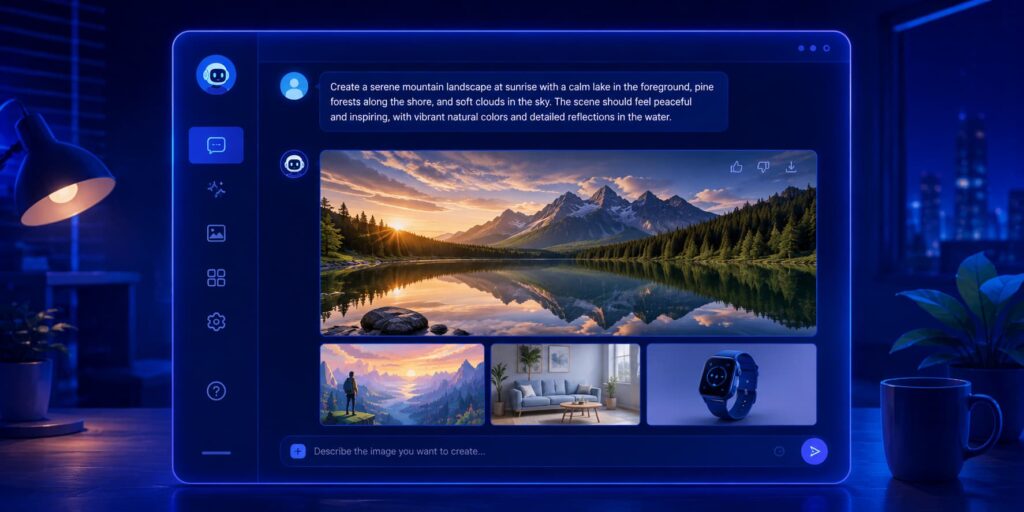
Gemini is Google’s AI assistant, and its image generation feature is built on Google’s own image models. It lives inside Gemini’s chat interface and also connects with Google Workspace tools like Docs and Slides.
How It Works
Similar to ChatGPT, you describe what you want in plain language. Gemini then generates the image and lets you refine it through follow-up prompts, almost like having a back-and-forth conversation with a designer.
Why People Use It
People lean on Gemini because it understands context well. It can read a long paragraph, pull out the key idea, and turn it into a visual. It’s also handy if your team already works inside Google’s ecosystem, since everything connects smoothly.
ChatGPT vs Gemini: Feature & Pricing Comparison
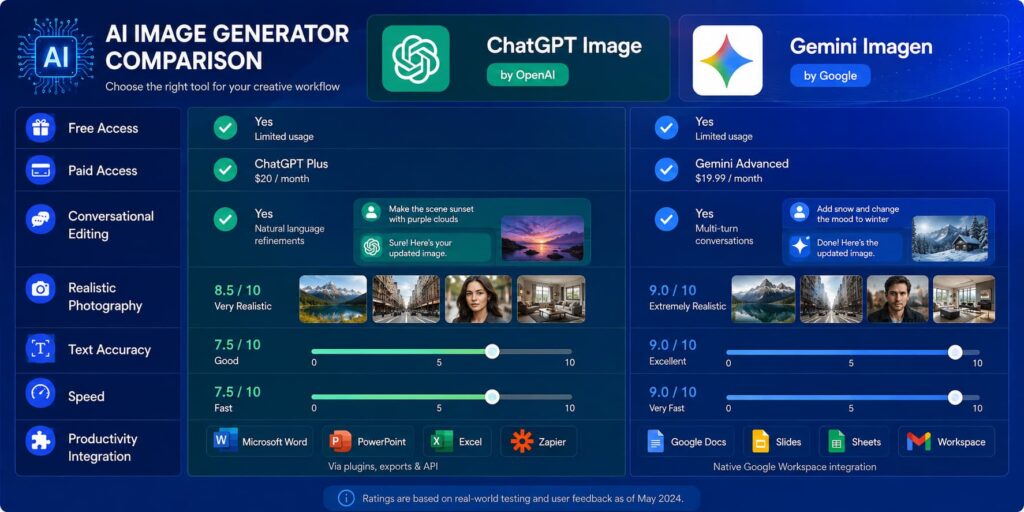
When you’re deciding which AI image generator comparison matters most to you, features and cost usually top the list. Both tools offer free access with limits, and both offer paid plans that unlock faster generation and higher quality output.
ChatGPT’s free plan gives you a limited number of image generations per day, while its paid plan (ChatGPT Plus) offers more generous limits and priority access during busy hours. Gemini’s free tier is tied to your Google account and also caps daily usage, with Gemini Advanced offering higher limits and integration with Workspace apps.
Here’s a quick side-by-side view:
| Feature | ChatGPT | Gemini |
| Free plan available | Yes, with daily limits | Yes, with daily limits |
| Paid plan | ChatGPT Plus (~$20/month) | Gemini Advanced (~$19.99/month) |
| Image editing | Yes, conversational edits | Yes, conversational edits |
| Text-in-image accuracy | Good | Slightly better in some tests |
| Workspace integration | Limited | Strong (Docs, Slides, Gmail) |
| Realistic photo quality | Strong | Strong |
| Speed | Fast | Fast |
Neither tool is dramatically cheaper than the other, so the real decision comes down to which workflow fits your daily tasks better.
How We Tested Both Tools
To answer the question of which AI is better for image generation, we didn’t just guess. We ran the same prompts through both tools and compared results side by side, the same way you’d compare two contractors bidding on the same job.
We used identical prompts covering business graphics, realistic portraits, product mockups, and images with text or logos. We noted how long each tool took, how closely the output matched the prompt, and how easy it was to make edits afterward.
Checking Key Factors
We focused on four things: accuracy to the prompt, image quality, ease of editing, and speed. We also paid attention to how each tool handled tricky requests, like adding specific text inside an image or matching brand colors exactly.
ChatGPT vs Gemini: Side-by-Side Test Results
Numbers only tell half the story, so here’s what actually stood out once we put both tools through the same set of prompts.
The Scores Are Basically Tied
After running dozens of prompts, neither tool pulled far ahead. Both produced strong, usable images most of the time. It’s a bit like comparing two good chefs cooking the same recipe. The final dish looks a little different, but both are satisfying.
Where ChatGPT Tends to Win
ChatGPT handled complex, multi-step prompts more reliably. If you asked for a specific scene with five different elements, it kept better track of all the details. It also produced slightly more polished results for realistic human portraits and product photography.
Where Gemini Tends to Win
Gemini pulled ahead when it came to text inside images, like signs, labels, or logos. It also handled long, paragraph-style prompts more naturally, pulling out the important details without you needing to simplify your request first.
The Simple Takeaway
If your work leans on visual storytelling and photorealism, ChatGPT has a slight edge. If your work involves text-heavy graphics or you already live inside Google apps, Gemini feels more natural. Neither tool is a clear loser here. It really comes down to your specific tasks.
Which Tool Is Better for Your Profession

Not every job needs the same kind of image. A marketer wants eye-catching graphics, while an office worker just wants something quick that fits into a slide. Here’s how each tool lines up depending on what you do every day.
If You Write for a Living (Content, Marketing, Blogging)
Content creators and marketers often need fast visuals to pair with articles or social posts. ChatGPT’s strength with detailed prompts makes it a solid pick for blog headers and campaign graphics. If you’re also testing copywriting tools, it’s worth checking out these ad copy generators tested side by side for a fuller picture of your marketing toolkit.
If You’re in an Office Job Using Google Workspace or Microsoft Tools
If your day runs through Google Docs, Sheets, or Slides, Gemini plugs in directly and saves you time switching apps. If you work more visually, like architects and designers comparing outputs on identical briefs, this breakdown of AI rendering tools shows how similar side-by-side testing plays out for visual professionals.
If You Do Research, Journalism, or Need Fresh Info
Gemini’s connection to Google’s search and information tools makes it handy for pulling current context into your visuals, like illustrating a news event or a data trend with an up-to-date feel.
If You Work with Video, Audio, or Huge Documents
If your work involves managing lots of visual files, like photographers sorting through hundreds of shots, tools built for that specific job often outperform general AI chat tools. This comparison of AI photo tools for wedding photographers shows how specialized tools can save serious time.
Benefits of Using ChatGPT for Image Generation

Beyond raw image quality, ChatGPT offers a few everyday perks that make it worth keeping in your toolkit.
Easy to Use and Save Time
You don’t need design experience. Just describe what you need in plain English, and ChatGPT handles the technical part. This saves hours compared to hiring a designer for quick, everyday visuals.
Good for Personal or Business Use
Whether you’re making a birthday card or a client presentation graphic, ChatGPT flexes to fit the task. Many professionals also pair it with text-based tools, and this look at AI writing assistants for long-form content is a good next read if you want the complete picture of what these tools can do beyond images.
Benefits of Using Gemini for Image Generation
Gemini brings its own set of strengths to the table, especially if you value speed and smart context handling.
It Understands Text and Logic
Gemini reads long, detailed prompts and picks out what matters most, almost like a smart assistant who already knows your shorthand. This makes it great for people who don’t want to over-explain every detail.
It Can Edit, Not Just Create
Beyond generating fresh images, Gemini handles editing requests smoothly. You can ask it to change a background, adjust lighting, or swap an object, all within the same chat.
Limitations to Know Before You Choose
Less Control Than Specialized Tools
Neither ChatGPT nor Gemini gives you the fine-tuned control that dedicated design software offers. If you need pixel-perfect precision, like adjusting exact layer positions, these tools may feel limiting compared to specialized platforms.
Not Fully Free
Both tools cap free usage. If you generate images often, you’ll likely need a paid plan eventually. It’s worth budgeting for this if image creation becomes part of your regular workflow, especially for an AI image generator for business use case where volume matters.
How to Choose the Right Tool for Your Needs
Still not sure which one fits? Match your main use case to one of these three scenarios and go from there.
If You Want Ease and Everyday Use → Gemini
Gemini is a solid pick if you want something simple that plugs into tools you already use daily.
If You Need Realistic Photos → DALL·E via ChatGPT
For lifelike portraits or product shots, ChatGPT’s connection to DALL·E tends to produce sharper, more natural-looking results.
If You Need Text or Logos in Images → Ideogram
If your main need is clean, readable text inside images, like signage or logo concepts, a specialized tool like Ideogram often beats both general-purpose chat tools.
How to Get Started With Either Tool
Getting set up takes less than five minutes with either option. Here’s a quick rundown for each.
Starting With Gemini
Head to Gemini’s website or app, sign in with your Google account, and simply type your image request in the chat box. You can refine it with follow-up messages until it looks right.
Starting With ChatGPT
Open ChatGPT, either in your browser or the app, type your prompt describing the image you want, and wait a few seconds. From there, you can ask for changes in the same conversation.
Tips for Getting Better Results From Either Tool
Be specific. Instead of “a office,” try “a bright, modern office with plants and natural light.” Mention the style you want, like realistic, cartoon, or watercolor. If you need text in the image, spell it out exactly and double-check the spelling in the result. Break big requests into smaller steps if the first result misses the mark. And always review images for accuracy before using them publicly, especially for business or client work.
Final Verdict: Which One Actually Wins in 2026
So, does ChatGPT or Gemini truly win? Honestly, it’s close. ChatGPT edges ahead for realistic photos and detailed, multi-part scenes. Gemini edges ahead for text-heavy images and smooth integration with Google tools. Neither tool crushes the other across the board.
Your best move is to think about your daily tasks first. If you’re already living inside Google Workspace, Gemini saves you clicks. If you need sharper photorealism or work with complex prompts, ChatGPT likely serves you better. Try both with your own real-world tasks before committing to one, since the “winner” really depends on what you need it to do.