You hit “Apply” on fifty jobs. You hear back from two. Sound familiar?
The problem often isn’t you. It’s a piece of software that read your resume, got confused, and quietly moved on. The good news? With the right ChatGPT resume prompts and a clean template, you can write an ATS-friendly resume in about an hour. Here’s exactly how.
What Is an ATS-Friendly Resume?
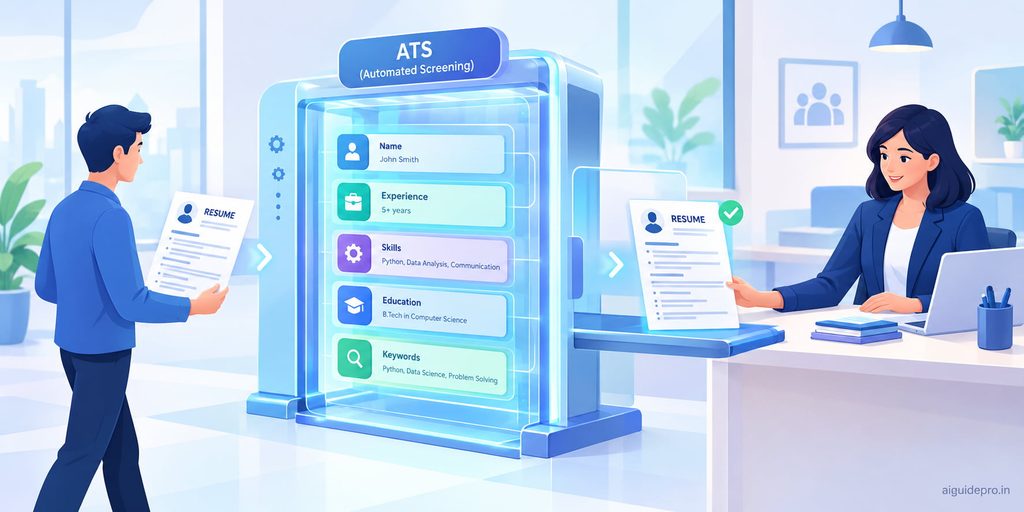
An ATS (Applicant Tracking System) is software that companies use to collect, sort, and filter job applications. Think of it as a digital front desk. Every resume passes through it before a human ever looks.
And almost every big employer has one. In 2026, Jobscan detected an ATS at 97.4% of Fortune 500 companies, with Workday as the most common system. Smaller companies use them too, through tools like Greenhouse, Lever, and BambooHR.
An ATS-friendly resume is one this software can read without errors. It has three things going for it:
- Clean formatting the system can scan from top to bottom
- Standard section headings like “Work Experience” and “Skills”
- The right keywords pulled straight from the job description
That’s it. It doesn’t need to look boring. It just needs to be readable by a machine first and impressive to a human second.
How ATS Software Reads Your Resume
Before you write a single line, it helps to know what happens after you click “Submit.” An ATS works in three quick steps.
3.1 Parsing Your Resume Text
First, the ATS “parses” your resume. That means it pulls out the text and drops it into labeled boxes: name, phone, job titles, dates, skills, and education.
Picture someone copying your resume into an online form by hand. If your layout is messy, they’ll put things in the wrong boxes. A job title in a text box or a skill hidden inside a graphic might get lost entirely. That’s why simple formatting matters so much.
3.2 Matching Keywords to the Job
Next, the system compares your resume to the job description. It looks for matching words and phrases, such as “project management,” “SQL,” or “customer retention.”
Some systems are smart enough to spot close matches. Many still lean on exact wording. So if the job asks for “Search Engine Optimization” and you only wrote “SEO,” it’s safest to include both.
3.3 Ranking and Filtering Candidates
Finally, the ATS helps recruiters sort the pile. Recruiters might filter by a skill, a job title, or a certification. Some systems also score how well each resume matches the job.
Here’s an important truth: an ATS rarely “rejects” you on its own. But if a recruiter searches for “Python” and your resume doesn’t say “Python,” you simply won’t show up. Being invisible works the same as being rejected.
💡 Pro Tip: Think like a recruiter typing into a search bar. What 5–10 words would they search to find someone like you? Those words must be on your resume.
Benefits of Using ChatGPT for Your Resume
You could do all of this by hand. But ChatGPT turns hours of work into minutes. Here’s why it works so well as an AI resume builder.
4.1 Saves Time
Writing a resume from a blank page is slow. ChatGPT gives you a solid first draft in seconds. You spend your energy editing, not staring at an empty screen.
4.2 Finds the Right Keywords
Paste in a job description and ChatGPT can pull out the skills, tools, and phrases the employer cares about. It’s like having a friend who reads the job post with a highlighter.
4.3 Improves Wording and Clarity
Most of us undersell ourselves. “Helped with social media” becomes “Grew Instagram followers by 40% in six months through a weekly content calendar.” ChatGPT is great at turning vague duties into clear, strong statements. If you’re curious how other AI writing tools compare for this kind of polishing, that guide breaks down the options.
4.4 Makes Tailoring Easy
Every job deserves a slightly different resume. Doing that manually for 20 applications is exhausting. With ChatGPT, you can tailor your resume to a new job in about ten minutes.
And there’s evidence it helps. A large field experiment published by the National Bureau of Economic Research, covering around 500,000 job seekers, found that people who got automated writing help were hired about 8% more often.
What You Need Before You Start
ChatGPT is only as good as what you give it. Feed it vague details, and you’ll get a vague resume. Gather these three things first.
5.1 The Job Description
Copy the full job posting, not just the title. The responsibilities and requirements sections hold the keywords you need. Save it in a doc so you can paste it anytime.
5.2 Your Current Resume or Work History
Have your old resume ready. No resume yet? A rough list works fine: job titles, company names, dates, and a few lines about what you did. If you’re a student or recent graduate building your first one, this student guide walks you through presenting your background and education with AI.
5.3 A List of Your Achievements
This is the step most people skip, and it’s the most important. Write down wins with numbers wherever you can:
- Money saved or earned
- Time saved
- Customers served
- Team size managed
- Awards, promotions, or projects completed
Don’t worry about polish. A messy list like “fixed billing errors, saved about 10 hrs a week” is perfect raw material.
✅ Check old performance reviews, emails from your boss, or project reports. They’re full of forgotten wins.
How to Write an ATS-Friendly Resume with ChatGPT
Now the fun part. Follow these seven steps in one ChatGPT conversation so it remembers your details as you go.
6.1 Share Your Background with ChatGPT
Start by giving ChatGPT context. Paste your current resume (with your phone number and address removed) and tell it what you’re aiming for.
Something like: “I’m a marketing coordinator with 3 years of experience applying for a digital marketing manager role. Here is my current resume. Don’t rewrite anything yet. Just confirm you understand my background.”
That last line matters. It stops ChatGPT from rushing ahead and lets you build the resume piece by piece.
6.2 Pull Keywords from the Job Description
Next, paste the job description and ask ChatGPT to list the key skills, tools, and qualifications. Ask it to group them into hard skills, soft skills, and tools.
Then compare that list to your resume. Which keywords do you actually have but never mentioned? Those are your quick wins. Which ones don’t you have? Leave those out. Honesty beats a keyword match every time.
6.3 Write a Strong Summary
Your professional summary sits right under your name. It’s a 2–4 line pitch that tells a recruiter who you are and why you fit.
Ask ChatGPT to write three versions using the top keywords. Then pick the one that sounds most like you, or blend two together. Avoid empty phrases like “results-driven team player.” Specific always beats generic.
6.4 Rewrite Your Work Experience
This is where your resume wins or loses. Ask ChatGPT to rewrite each job’s bullet points using a simple formula:
Action verb + what you did + measurable result
Here’s a before-and-after:
| Before | After |
|---|---|
| Responsible for handling customer emails | Resolved 60+ customer emails daily, cutting average response time from 24 hours to 6 |
| Worked on the company website | Redesigned 12 website landing pages, increasing sign-ups by 18% in one quarter |
Give ChatGPT your achievement list from Step 5.3. Without real numbers, it may guess. Never let it guess.
6.5 List Your Skills
Ask ChatGPT to build a skills section from the job keywords that you truly have. Keep it to 8–15 skills, focused on hard skills and tools. Recruiters search for “Excel” and “Salesforce,” not “hard worker.”
6.6 Add Education and Certifications
List your degree, school, and graduation year. Add certifications with their exact official names, like “Google Analytics Certification” or “PMP.” If you’re short on experience, ask ChatGPT to suggest relevant coursework or projects to include.
6.7 Review and Fact-Check the Output
Never send the first draft. Read every line out loud and ask yourself:
- Is this true? Could I explain it in an interview?
- Are these numbers real?
- Does this sound like me?
ChatGPT sometimes adds skills or inflates results to make you look good. That backfires the moment an interviewer asks, “Tell me more about that.” You’re the editor. ChatGPT is just the assistant.
⚠️ If ChatGPT adds a tool, certification, or number you didn’t give it, delete it. One false claim can cost you the job, even after you’re hired.
Best ChatGPT Prompts for an ATS-Friendly Resume
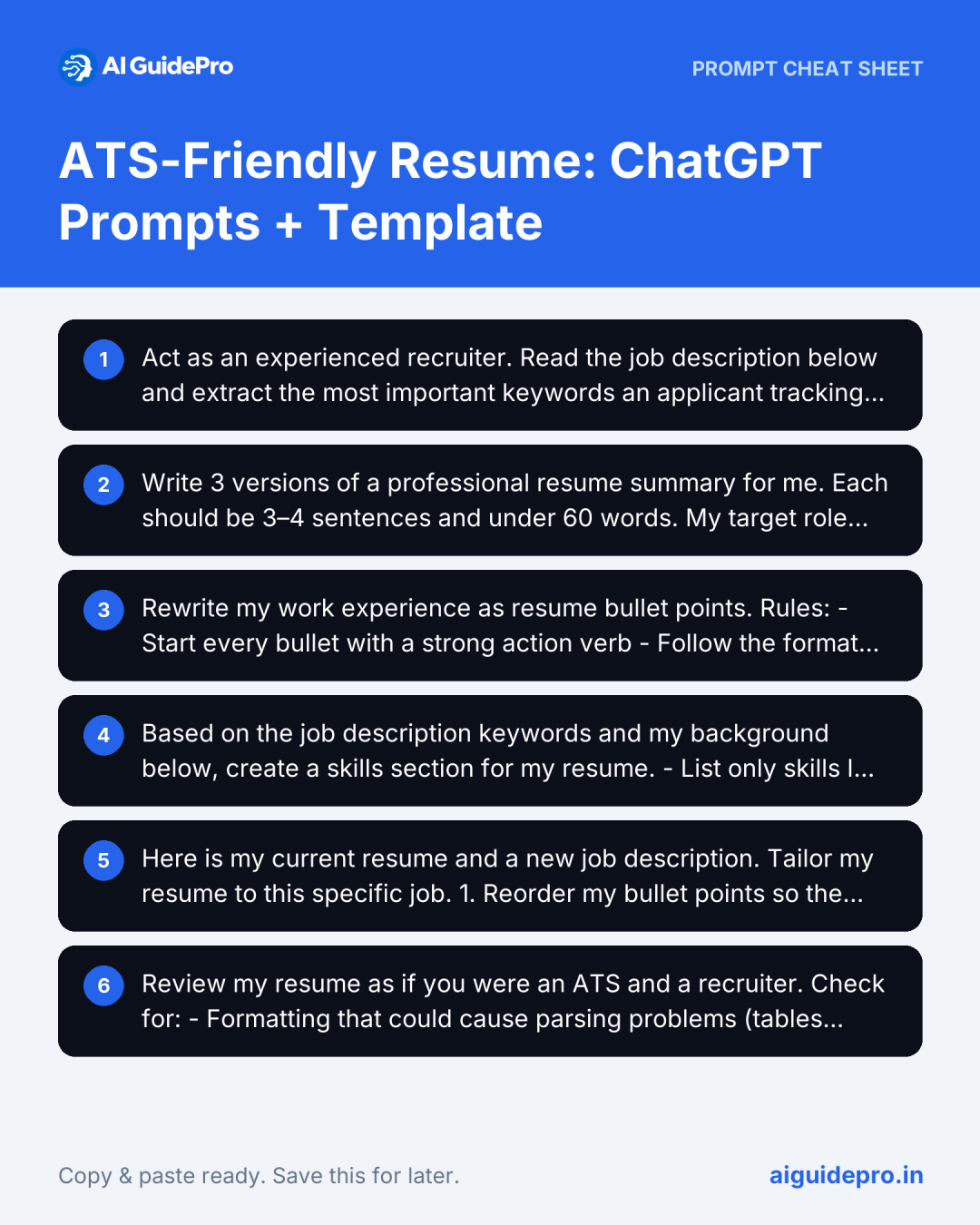
Here are six ready-to-use ChatGPT resume prompts. Copy them, fill in the brackets, and paste them into ChatGPT. They work best in order, inside one conversation.
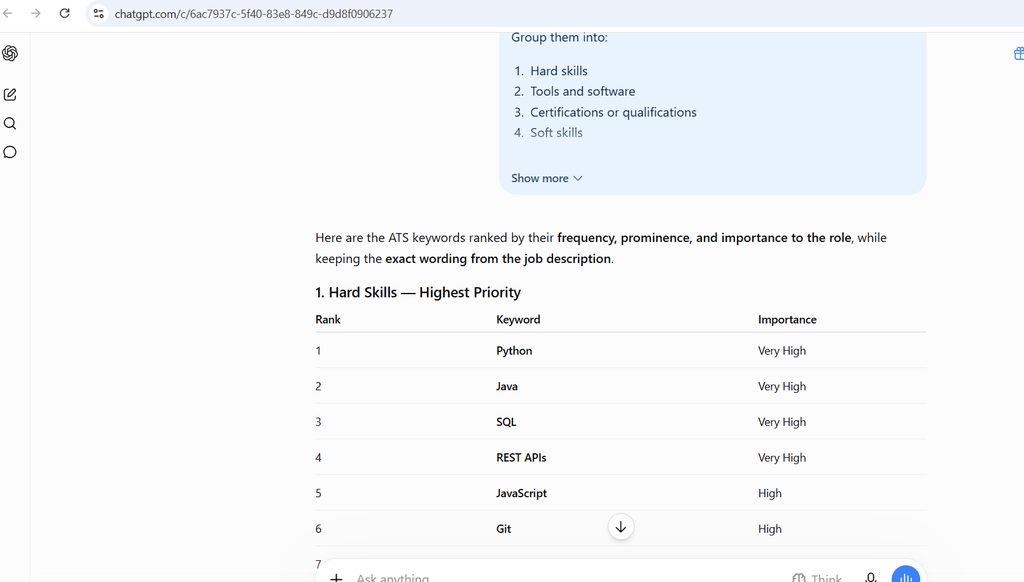
7.1 Prompt for Keyword Extraction
Act as an experienced recruiter. Read the job description below and extract the most important keywords an applicant tracking system would scan for.

Group them into:
1. Hard skills
2. Tools and software
3. Certifications or qualifications
4. Soft skills

Rank each group from most to least important based on how often and how prominently each term appears. Keep the exact wording used in the job description.

Job description:[]
Why it works: Asking for the “exact wording” stops ChatGPT from swapping in synonyms, which the ATS might not recognize.
7.2 Prompt for a Professional Summary
Write 3 versions of a professional resume summary for me. Each should be 3–4 sentences and under 60 words.

My target role: [job title]
Years of experience: [number]
Top skills: [list 4–5 skills]
Biggest achievement: [one achievement with a number]

Include these keywords naturally: [paste top 5 keywords from 7.1]

Avoid clichés like "results-driven," "team player," or "passionate." Use a confident, plain tone.
Why it works: Banning clichés forces ChatGPT to use your real details instead of filler.
7.3 Prompt for Achievement-Based Bullet Points
Rewrite my work experience as resume bullet points.

Rules:
- Start every bullet with a strong action verb
- Follow the format: action + task + measurable result
- Use only the facts and numbers I provide. Do not invent metrics. If a result is missing, write [ADD NUMBER] so I can fill it in.
- Write 4–6 bullets per job
- Naturally include these keywords where they truly apply: [keywords]

Job title: [title]
Company: [company]
Dates: [start – end]
What I did and achieved:[]
Why it works: The “[ADD NUMBER]” rule is your safety net. It flags gaps instead of filling them with made-up data.
7.4 Prompt for a Skills Section
Based on the job description keywords and my background below, create a skills section for my resume.

- List only skills I actually have, based on my experience
- Include 8–15 skills
- Prioritize hard skills and tools over soft skills
- Use the exact terms from the job description
- Format as a simple comma-separated list, no tables or icons

My background: [paste resume or summary]
Job keywords: [paste list from 7.1]
7.5 Prompt to Tailor Your Resume to a Job
Here is my current resume and a new job description. Tailor my resume to this specific job.

1. Reorder my bullet points so the most relevant ones come first
2. Adjust wording to match the job's language, but only where it's accurate
3. Suggest which bullets to cut if they aren't relevant
4. Update my summary for this role
5. List any important job requirements my resume doesn't address, so I can decide whether to add them honestly

Do not add experience I don't have.

My resume:[]

Job description:[]
Why it works: Step 5 turns ChatGPT into a gap finder. You decide what to add, not the AI.
7.6 Prompt to Check ATS Readiness
Review my resume as if you were an ATS and a recruiter.

Check for:
- Formatting that could cause parsing problems (tables, columns, headers/footers, graphics, unusual symbols)
- Non-standard section headings
- Missing keywords from the job description
- Weak or vague bullet points
- Spelling and grammar errors

Give me a prioritized list of fixes, most important first.

My resume:[]

Job description:[]
💡 Pro Tip: ChatGPT can’t see your actual file layout when you paste text. For formatting checks, upload the file itself (paid plans and many free accounts support file uploads) or use an ATS checker, covered later in this guide.
Free ATS-Friendly Resume Template
Here’s a simple ATS resume template you can copy into Google Docs or Word. It’s plain on purpose. Plain is what gets read.
FIRST LAST
City, State | Phone | Email | linkedin.com/in/yourname

PROFESSIONAL SUMMARY
[Job title] with [X] years of experience in [industry/area]. Skilled in [keyword], [keyword], and [keyword]. Known for [biggest achievement with a number]. Looking to bring [strength] to a [target role] position.

WORK EXPERIENCE
Job Title | Company Name | City, State
Month Year – Month Year
- Action verb + task + measurable result
- Action verb + task + measurable result
- Action verb + task + measurable result

Job Title | Company Name | City, State
Month Year – Month Year
- Action verb + task + measurable result
- Action verb + task + measurable result

SKILLS
Skill, Skill, Skill, Tool, Tool, Tool, Certification-related skill

EDUCATION
Degree, Major | University Name | Year

CERTIFICATIONS
Certification Name | Issuing Organization | Year
Let’s walk through each part.
8.1 Contact Information
Put your name, city, phone, email, and LinkedIn URL at the top, in the main body of the page. Don’t place them in the document header. Some ATS tools skip headers and footers completely, so a recruiter could end up with no way to reach you. You don’t need your full street address. City and state are enough.
8.2 Professional Summary
Keep it to 2–4 lines. Lead with your job title and years of experience, then add your top keywords and one standout result. This is your elevator pitch, so make it specific to the role.
8.3 Work Experience
List jobs in reverse order, newest first. Use the same date format everywhere, like “Jan 2023 – Present.” Aim for 3–6 bullets per role, with the most relevant ones on top. Older or unrelated jobs can get just one or two lines.
8.4 Skills
A simple list, separated by commas or bullets. No star ratings, progress bars, or skill charts. An ATS can’t read a graphic that says you’re “4 out of 5” in Excel. It only reads words.
8.5 Education and Certifications
List your degree, school, and year. Put certifications in their own section so they’re easy to find. If you have lots of experience, this section moves to the bottom. If you’re a fresh graduate, it can sit right after your summary.
ATS Formatting Tips to Follow
Great content won’t matter if the ATS can’t read it. Follow these five rules.
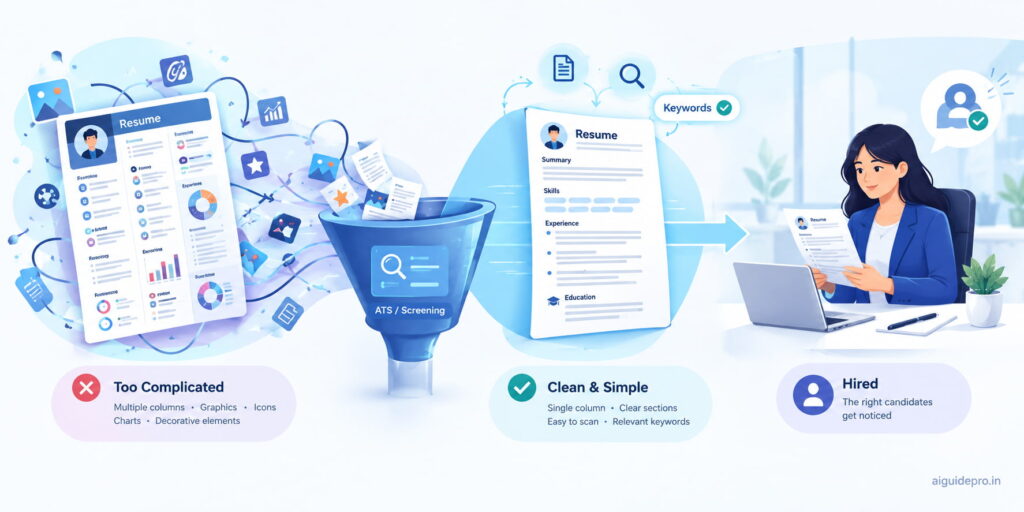
9.1 Use a Simple Layout
Stick to a single column that reads top to bottom. Use plain bullet points (• or -) and clear spacing. Think of your resume like a recipe card, not a magazine page.
9.2 Stick to Standard Headings
Use headings the ATS expects:
| Use this | Not this |
|---|---|
| Work Experience | My Journey |
| Skills | What I Bring |
| Education | Where I Learned |
| Professional Summary | About Me ✨ |
Creative headings confuse the system about where each section starts.
9.3 Choose Common Fonts
Pick fonts like Arial, Calibri, Helvetica, Garamond, or Georgia. Use 10–12 point size for body text and 14–16 for your name. Fancy fonts can turn into gibberish during parsing.
9.4 Save in the Right File Format
A .docx file is the safest choice for most systems. A text-based PDF (one exported from Word or Google Docs, not a scanned image) also works well with modern ATS software. Always follow the job posting’s instructions if it names a format.
9.5 Avoid Tables, Graphics, and Columns
Tables, text boxes, icons, photos, and multi-column layouts can scramble your text. Your job title might merge with your skills, or vanish altogether. Save the design flair for your portfolio.
Common Mistakes to Avoid When Using ChatGPT
ChatGPT is a powerful helper, but it’s easy to misuse. Watch out for these five traps.
10.1 Copying Output Without Editing
Raw ChatGPT text often sounds polished but generic. Words like “spearheaded,” “leveraged,” and “dynamic” show up everywhere. Recruiters read hundreds of resumes and can spot this pattern fast. Rewrite each line so it sounds like you’d say it in an interview. For a deeper look at keeping your voice real, read this guide on AI authenticity.
10.2 Stuffing Too Many Keywords
Repeating “project management” ten times won’t trick anyone. Modern ATS tools and human readers both notice. Use each important keyword naturally, one to three times, in places where it actually fits.
10.3 Adding False or Inflated Details
ChatGPT may “helpfully” invent a percentage or upgrade “assisted” to “led.” Catch these. Background checks, reference calls, and interview questions will expose anything untrue.
10.4 Using One Resume for Every Job
A generic resume matches no job well. Tailor your summary, skills, and top bullets for each role using Prompt 7.5. It takes ten minutes and can make a real difference in your callback rate.
10.5 Sharing Private Information
Don’t paste your full address, phone number, ID numbers, or salary history into ChatGPT. Use placeholders like “[PHONE]” and add real details yourself in the final document. You can also turn off chat history or model training in ChatGPT’s settings for extra privacy.
Never share another person’s private data either, such as a reference’s phone number or a former client’s details.
How to Check If Your Resume Is ATS-Friendly
You’ve written it. Now test it before you hit “Apply.”
11.1 Use an Online ATS Checker
Tools like Jobscan, Resume Worded, and Teal compare your resume to a job description and score the match. They flag missing keywords and formatting problems. Most offer a few free scans.
Treat the score as a guide, not a grade. These tools simulate an ATS. They aren’t the employer’s real system.
11.2 Do a Plain-Text Test
This one is free and surprisingly revealing. Copy everything from your resume and paste it into Notepad (Windows) or TextEdit in plain-text mode (Mac).
Then read it. Is the order logical? Are your name, job titles, and dates intact? If the text comes out jumbled, an ATS will see the same mess.
11.3 Compare Against the Job Description
Put the job description and your resume side by side. Check off each must-have skill. If a key requirement is missing and you have that experience, add it. Many career coaches suggest aiming to cover most of the core requirements, since recruiters often filter by them.
Tip: Run Prompt 7.6 after your plain-text test for a quick second opinion.
Final Thoughts
An ATS-friendly resume isn’t about gaming a robot. It’s about making your real experience easy to find and easy to read.
ChatGPT makes that faster. It pulls keywords, sharpens your bullet points, and helps you tailor every application. But you still steer. Keep it honest, keep it simple, and keep it sounding like you.
Start with one job you really want. Run the six prompts, drop the result into the template, and test it. Then repeat for the next one.
Want more practical ways to put AI to work for your career and daily tasks? Browse our full collection of AI guides.
Frequently Asked Questions
Can ChatGPT write a complete resume for me?
Yes, it can produce a full draft if you give it enough details about your experience. But treat it as a first draft. You’ll need to check facts, add real numbers, and adjust the tone so it sounds like you. The best results come from building it section by section, like in the steps above.
Is it okay to use ChatGPT to write a resume?
Yes. Using AI to improve your wording is no different from asking a friend or career coach to review your resume. The key rule is honesty. Everything on the page must be true, and you should be able to talk about every line in an interview.
Can recruiters tell if a resume was written by AI?
Sometimes. Unedited AI text tends to repeat the same buzzwords and sound oddly polished but vague. Most recruiters care less about how you wrote it and more about whether it’s specific and believable. Real numbers, real projects, and your own voice make the question irrelevant.
Does the free version of ChatGPT work for resumes?
Yes. The free version handles keyword extraction, bullet rewrites, and summaries well. Paid plans offer more usage and stronger file-upload features, which help when you want ChatGPT to review your actual document. For most job seekers, the free plan is plenty to start.
How many keywords should an ATS resume include?
There’s no magic number. Focus on covering the job’s core skills and tools, usually around 10–20 relevant terms spread across your summary, experience, and skills sections. Use each naturally. Relevance matters far more than volume.
What file format is best for ATS: PDF or Word?
A .docx file is the safest bet for nearly every ATS. A text-based PDF works with most modern systems and keeps your layout intact. If the job posting asks for a specific format, always use that one.
Can ChatGPT check if my resume passes ATS?
It can spot common problems, like missing keywords, weak headings, or risky formatting. But it isn’t a real ATS and can’t guarantee how a specific employer’s system will read your file. Pair ChatGPT’s review with an online ATS checker and the plain-text test.
How often should I update my resume with ChatGPT?
Tailor it for every job you apply to. Beyond that, update your master resume every few months, or right after a big win, promotion, or new certification. Adding achievements while they’re fresh saves you from hunting for them later.