Professional product photos can cost hundreds of dollars per shoot, and you need new ones every time you launch a product, run a sale or change season. AI image tools like Midjourney, ChatGPT, Gemini and Flux can now create studio-quality backgrounds, lifestyle scenes and ad creatives in seconds. These 40 AI product photography prompts are organised by style, with a simple formula you can reuse and the honest limits you need to know before using AI images in your store.
Who wrote this: I’m a software developer who builds tools for creators and online sellers. I’ve tested these prompt patterns across several image models. Results vary by model and version, so expect to run a prompt a few times and tweak it.
First, the Big Limitation: AI Doesn’t Know Your Exact Product
If you type “a bottle of [my brand] serum”, an AI model will invent a bottle that looks roughly right but isn’t yours: wrong label, wrong cap, wrong shape. That’s a problem, because showing a product that differs from what customers receive can mislead buyers and break marketplace rules.
There are three honest ways to use AI for product photos:
| Approach | How it works | Best for |
|---|---|---|
| 1. Edit your real photo | Upload your product photo and ask the AI to change the background, lighting or scene | Main product images, ads |
| 2. Generate a scene, then composite | Create an empty background or scene, then place your cut-out product in it (Photoshop, Canva, Photoroom) | Lifestyle and seasonal images |
| 3. Generate concepts | Fully AI-made product images for mood boards, briefs and testing ideas | Planning a real shoot, pitch decks |
For approach 1, see our tests of ChatGPT vs Gemini for photo editing and our list of the best AI image editors.
The Product Photo Prompt Formula
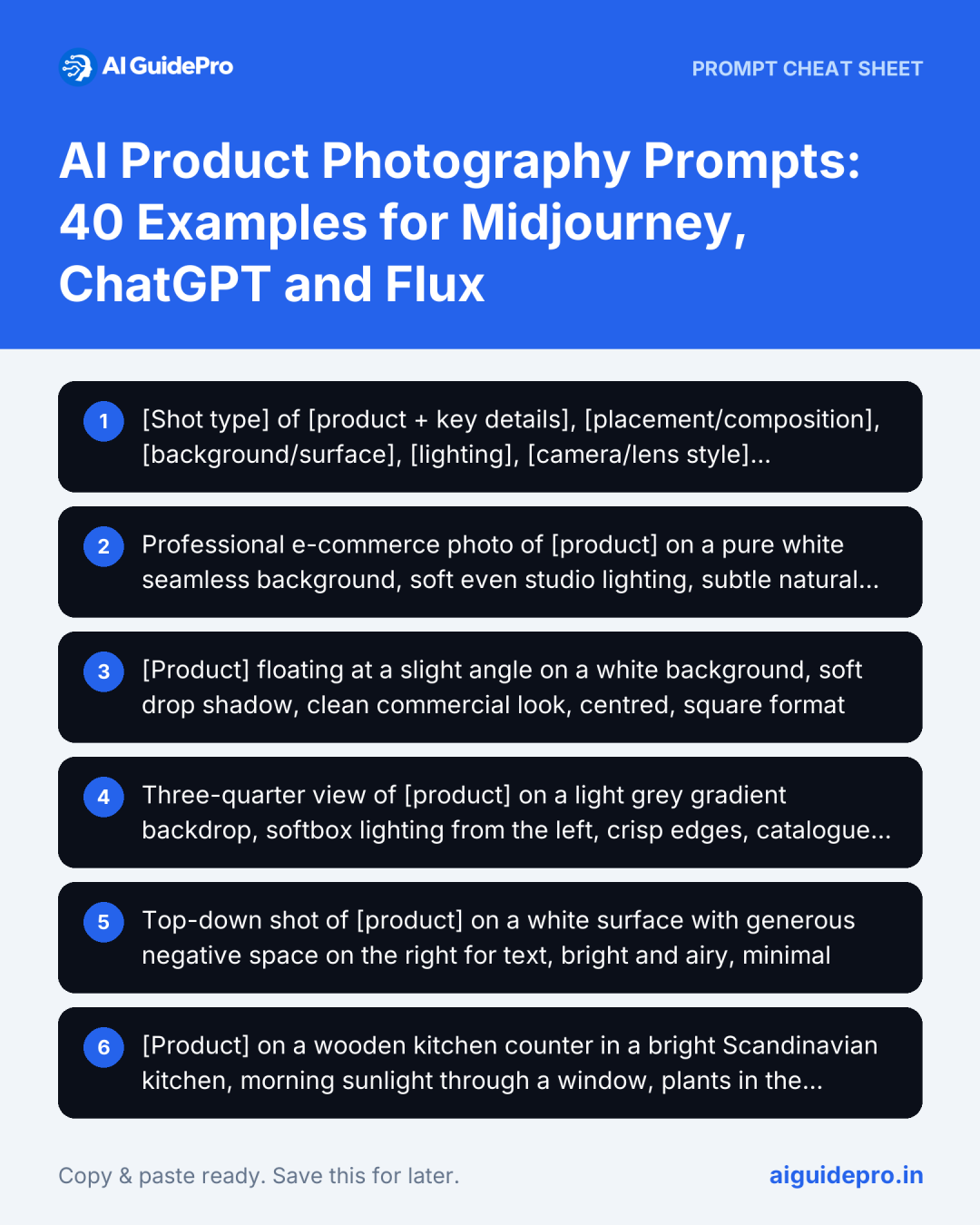
[Shot type] of [product + key details], [placement/composition], [background/surface], [lighting], [camera/lens style], [mood/colour palette], [aspect ratio]Example: “Close-up studio shot of a frosted glass serum bottle with a gold dropper, centred on a wet black stone, soft diffused side lighting with gentle reflections, shot on 100mm macro lens, minimal luxury mood, deep green and gold palette, square format”
Our free AI Image Prompt Generator (product mode) builds prompts like this from a few dropdowns.
Model tips: In Midjourney, add aspect ratio with --ar 1:1, --ar 4:5 or --ar 16:9. In ChatGPT and Gemini, just write “square”, “portrait 4:5” or “wide 16:9” in the prompt. When editing a real photo, start with “Keep the product exactly as it is; change only the background to…”.
40 AI Product Photography Prompts
Clean White and Studio Backgrounds
Marketplace-style images. Many marketplaces, including Amazon, require a pure white background for the main image, so check the rules for yours.
Professional e-commerce photo of [product] on a pure white seamless background, soft even studio lighting, subtle natural shadow beneath, sharp focus, high detail, square format[Product] floating at a slight angle on a white background, soft drop shadow, clean commercial look, centred, square formatThree-quarter view of [product] on a light grey gradient backdrop, softbox lighting from the left, crisp edges, catalogue styleTop-down shot of [product] on a white surface with generous negative space on the right for text, bright and airy, minimalLifestyle Scenes
[Product] on a wooden kitchen counter in a bright Scandinavian kitchen, morning sunlight through a window, plants in the background, shallow depth of field, warm and inviting[Product] on a desk next to a laptop and a cup of coffee in a modern home office, natural window light, cosy productive mood, 4:5 portrait[Product] on a bathroom shelf with folded white towels and a eucalyptus sprig, soft spa lighting, calm and clean[Product] on a picnic blanket in a sunny park, soft bokeh background, golden hour, relaxed summer mood[Product] in a gym bag with a towel and sneakers on a locker room bench, energetic, crisp lighting[Product] on a bedside table with a book and a warm lamp at night, cosy evening atmosphereFlat Lay
Flat lay of [product] surrounded by [related items, e.g., notebook, pen, glasses] on a pastel pink background, top-down, evenly lit, Instagram styleMinimal flat lay of [product] with one dried flower on beige linen texture, soft shadows, neutral tonesColourful flat lay of [product] with fresh fruit slices on a bright yellow background, playful, high saturationFlat lay of [product] on dark slate with scattered coffee beans, moody overhead lightingLuxury and Premium
[Product] on a black marble pedestal, dramatic spotlight from above, dark background, gold accents, luxury advertising style[Product] resting on silk fabric in deep emerald green, soft reflections, elegant high-end mood[Product] on a glass shelf with water droplets, cool blue rim lighting, sleek and premiumMacro shot of [product] details and texture, shallow depth of field, rich contrast, premium brand campaignBeauty and Skincare
[Skincare bottle] on a wet stone surrounded by water ripples, soft diffused light, fresh and clean, spa aesthetic[Cosmetic product] with a creamy swatch smear on a pastel background, top-down, soft beauty lighting[Product] among fresh botanical ingredients (aloe leaf, cucumber slices), bright natural light, organic feel[Lipstick/cosmetic] on a mirror surface with soft pink reflections, glamorous editorial lightingFood and Drink
[Beverage can/bottle] with condensation droplets on a bed of ice, splashing water, bright backlight, refreshing summer ad[Packaged snack] on a rustic wooden board with ingredients scattered around, warm natural light, appetisingHero shot of [coffee bag] with a steaming mug and roasted beans, dark moody café lighting[Sauce jar] on a kitchen table with a finished dish in soft focus behind it, homely and warmTech and Gadgets
[Gadget] on a dark reflective surface with neon blue and purple rim lighting, futuristic tech ad[Headphones] on a minimal concrete block, soft shadows, modern industrial style[Smartwatch] on a wrist mid-run in a city at sunrise, motion blur background, sporty lifestyleExploded view concept of [gadget] components floating in order on a white background, technical and cleanFashion, Jewellery and Accessories
[Handbag] on a velvet chair in a sunlit boutique, soft luxury mood, editorial style[Ring/necklace] on a smooth pebble with soft morning light and water droplets, macro detail[Sneakers] mid-air against a bright solid colour background, dynamic and playful[Sunglasses] on warm sand with palm leaf shadows, summer holiday vibeSeasonal and Promotional
Swap the season to match your campaign calendar.
[Product] surrounded by pine branches, fairy lights and wrapped gifts, cosy winter holiday mood, warm bokeh[Product] with spring flowers and pastel eggs, fresh light colours, Easter promotion[Product] on a black background with bold red tags and confetti, high contrast, Black Friday sale ad, space for text on the left[Product] with autumn leaves and a knit blanket, warm golden light, cosy fall moodEditing Prompts for Your Real Product Photos
Upload your own photo first, then use prompts like these in an image editor that supports it (for example ChatGPT, Gemini or a dedicated product photo tool):
Keep the product exactly as it is, including the label, shape and colours. Replace the background with [scene]. Match the lighting direction and add a natural shadow under the product.Keep the product unchanged. Remove the cluttered background and place it on a pure white background with a soft shadow, suitable for a marketplace main image.Keep the product unchanged. Extend the canvas to a 16:9 banner and fill the new space with a matching [colour] background, leaving empty space on the left for text.Always compare the edited image with your real product. Some editors subtly change text, logos or colours. If anything changed, regenerate or fix it before you publish.
Rules for Using AI Product Images Honestly
- Show the real product accurately. Colour, size, label and what’s included must match what the customer receives.
- Follow marketplace image rules. Amazon, Etsy and Google Shopping each have their own requirements for main images.
- Be careful with “lifestyle” claims. Don’t imply results, sizes or uses the product can’t deliver.
- Check the tool’s licence. Commercial use rights differ between image generators and plans.
- Watch for AI artefacts: warped text, extra fingers, impossible reflections. Zoom in before publishing.
Want ready-made tools for this? Try the background prompt mode, the Photography & Creative AI Starter Kit, and our hands-on ChatGPT Images test.
Frequently Asked Questions
Can AI replace a product photographer?
For backgrounds, lifestyle scenes, seasonal variations and quick ad tests, AI can save a lot of time and money. For accurate hero shots of complex products, a real photo of the actual product (which you can then edit with AI) is still the safest choice.
Which AI is best for product photography?
Midjourney is strong for artistic scenes, ChatGPT and Gemini are convenient for editing your own photos with plain-language instructions, and Flux-based tools are popular for realistic images. Test the same prompt on two tools and compare.
Can I use AI-generated product images on Amazon?
You need to follow Amazon’s image requirements, including accurately representing the product, and its main image rules. Edited real photos are usually the safer option for main images. Check current Seller Central guidelines.
Why does the AI change my product label or logo?
Image models redraw the whole picture and often struggle with text. Use an editor that supports “keep the product unchanged”, or composite your real product cut-out onto an AI-generated background.
Do I own AI-generated images?
It depends on the tool’s terms and on the law where you are, which is still evolving. Read each tool’s licence before using images commercially.
Final Thoughts
AI won’t photograph your product for you, but it can give you a studio, a set designer and a seasonal campaign on demand. Use the formula, start with the style that fits your brand, keep your real product accurate, and save the prompts that work so every new product launch takes minutes, not days.