I gave eight popular AI writing assistants the same five everyday tasks (a blog post, an email, a rewrite, social captions and resume bullets) to see which ones save time and which mostly create more editing. Here’s what each did well, where each fell short, and which to pick for the kind of writing you do.
How I tested: September 2026, using free plans or free trials where available; the same prompts, word for word, in every tool. Prices and plans were re-checked on each vendor’s site in October 2026, because several of these products have changed direction since.
Quick Comparison
| Tool | Best for | Writing quality | Editing | Free plan (Oct 2026) | Main limitation |
|---|---|---|---|---|---|
| ChatGPT | All-purpose writing | Excellent | Very good | Yes, with limits | States wrong facts confidently |
| Grammarly | Editing and proofreading | Good | Excellent | Yes (100 AI prompts/month) | Limited long-form drafting |
| Jasper | Marketing teams | Very good | Good | No; 7-day trial | Costly for solo users |
| Copy.ai | Sales and marketing workflows | Good | Fair | No; paid from $24/month | Generic long-form output |
| Writesonic | SEO blog content | Good | Fair | No; free trial | Drafts need heavy trimming |
| QuillBot | Paraphrasing and summaries | Fair | Very good | Yes, with word limits | Not built for original drafts |
| Notion AI | Notes to content | Good | Good | Trial only | Useful only if you use Notion |
| Microsoft Copilot | Office and email writing | Good | Good | Free app; Microsoft 365 features paid | Full features need a paid plan |
How to read the ratings: “Writing quality” is how close each tool’s first draft came to something I’d publish after light edits across the five tasks; “Editing” is how well it improved text I gave it. Excellent means usable with minor edits, Good means usable after a solid edit, and Fair means I rewrote most of it. The test results below explain each rating.
The 8 AI Writing Assistants I Tested
ChatGPT
- What I tested: all five tasks.
- What worked: the most flexible tool: it followed detailed instructions, handled follow-up edits well and changed tone on request. Email and rewrite results needed very little cleanup.
- Where it struggled: it sometimes stated wrong or outdated facts with total confidence, and early blog drafts leaned on safe, generic phrasing until I gave it examples of my style.
- Price (checked October 2026): free plan with limits; paid plans for more use.
- Best for: first drafts, brainstorming, emails and rewrites. The best single tool for beginners.
Grammarly
- What I tested: my messy paragraph and a rough cover letter.
- What worked: it caught every grammar slip and several awkward sentences I had missed, with a short reason for each change. It works in your browser and email, so it improves writing wherever you type.
- Where it struggled: its AI rewrite features are fine for short passages but limited for full drafts.
- Price (checked October 2026): free plan with 100 AI prompts a month; paid plans for more.
- Best for: final proofreading and workplace writing.
Jasper
- What I tested: a product launch email and ad copy.
- What worked: punchy copy that sounded like real marketing, and saved brand voice settings kept outputs on-brand better than most tools.
- Where it struggled: more tool, and more cost, than a solo writer or student needs.
- Price (checked October 2026): no free plan; Pro is $59 a month billed yearly ($69 monthly), with a 7-day trial.
- Best for: marketing teams that publish often in a consistent voice.
Copy.ai
- What I tested: sales emails, product descriptions and LinkedIn posts.
- What worked: short copy came out quickly and was usable; its workflows chain steps together, such as researching a prospect and then drafting outreach.
- Where it struggled: longer pieces felt generic. Copy.ai now positions itself as a “GTM AI” platform for sales and marketing teams rather than a general writing tool.
- Price (checked October 2026): no free plan; the Chat plan is $24 a month billed yearly ($29 monthly) for 5 seats.
- Best for: sales teams automating repeat outreach and product copy.
Writesonic
- What I tested: a long blog draft.
- What worked: fast, long drafts with headings and an intro, plus SEO features that pull in web information.
- Where it struggled: drafts ran too long and repeated points, and its sources needed checking. Writesonic now sells itself as an AI search visibility (SEO and GEO) platform; the article writer is one part of it.
- Price (checked October 2026): no free plan, but a free trial; paid plans start at $79 a month billed yearly.
- Best for: SEO teams that want structured drafts to edit, not publish as-is.
QuillBot
- What I tested: paraphrasing my clunky paragraph and summarizing a long article.
- What worked: its rewrite modes made the paragraph clearer in seconds, and the summarizer produced clean bullet points.
- Where it struggled: it’s not for original drafts, its formal mode can sound stiff, and Grammarly caught more grammar issues.
- Price (checked October 2026): free plan with word limits; paid plans for longer text and more modes.
- Best for: students and anyone who needs to rephrase or summarize.
Notion AI
- What I tested: turning rough meeting notes into a summary and a project update.
- What worked: it worked right where the notes lived, with no copying between apps, and summaries of my own pages were quick and accurate.
- Where it struggled: if you don’t already use Notion, the benefit mostly disappears.
- Price (checked October 2026): included in Notion’s Business plan ($20 per member a month); the Free and Plus plans get only a limited trial.
- Best for: teams that already plan and write in Notion.
Microsoft Copilot
- What I tested: emails, a short report and meeting follow-ups.
- What worked: clear, professional drafts and good tone changes; inside Word and Outlook it can draft and summarize from your own documents and email.
- Where it struggled: most in-app features need a paid Microsoft 365 plan with Copilot.
- Price (checked October 2026): free Copilot app; Microsoft 365 Copilot features are paid.
- Best for: office workers who live in Word, Outlook and Teams.
How They Did on Real Tasks
Blog Post Test
ChatGPT, Writesonic and Jasper gave the most usable blog drafts: ChatGPT’s was easiest to shape, Writesonic’s the most structured and Jasper’s had the strongest hooks. Every draft still needed new examples, fact-checks and a stronger voice. For a full blog workflow with a different assistant, see how to write SEO-friendly blog posts with Claude.
Email Writing Test
ChatGPT and Copilot wrote the clearest professional emails, with a clean subject line and a clear ask. Most tools handled short replies well, and “make this friendlier” or “make this firmer” worked well in ChatGPT, Copilot and Grammarly.
Rewriting Test
QuillBot and Grammarly made the fastest clarity fixes. ChatGPT cut text by a third without losing meaning; some tools cut useful details, so compare the result with your original. ChatGPT also gave the most natural tone changes.
Social Media Test
ChatGPT and Copy.ai produced the most varied post ideas; Jasper and Copy.ai wrote catchy captions but leaned on emojis and hashtags. ChatGPT was best at turning one blog post into a thread, a LinkedIn post and three captions. For short video scripts, see our guide to AI script writing for TikTok and Shorts.
Resume and Job Application Test
ChatGPT turned weak bullets like “handled social media” into results-focused lines, but it also made up a metric once, a real risk on a resume. ChatGPT and Copilot wrote solid cover letter drafts that sounded generic until I added real stories, and pasting the job description into the prompt made the biggest difference. For ATS-friendly formatting and more prompts, see our ATS-friendly resume guide with ChatGPT prompts.
AI saved the most time on emails, rewrites and repurposing. Blog posts and resumes needed the most human input, and a detailed prompt with an example made even average tools look good.
Also Worth Considering: Claude and Gemini
These two weren’t part of my eight-tool test, but they’re among the most-used AI writing tools, so they’re worth knowing about:
- Claude (Anthropic) is popular for long-form writing and natural-sounding prose, and it handles long documents well. Free plan available. See our Claude blog-writing guide.
- Gemini (Google) is built into Gmail and Google Docs on supported plans, which makes it handy if you work in Google Workspace. Free plan available.
Which AI Writing Assistant Should You Use?
| If you are… | Start with |
|---|---|
| An office professional | Microsoft Copilot if your company uses Microsoft 365; otherwise ChatGPT, plus Grammarly |
| A content creator | ChatGPT for ideas and repurposing; Jasper if you manage a brand voice |
| A student | QuillBot for summaries, Grammarly for polish, ChatGPT for brainstorming, within your school’s AI rules |
| An entrepreneur | ChatGPT for website copy and outreach |
| A blogger | ChatGPT or Claude for drafts, Grammarly for final polish |
| A job seeker | ChatGPT, with your real achievements and the job description in the prompt |
Prompts That Worked Best
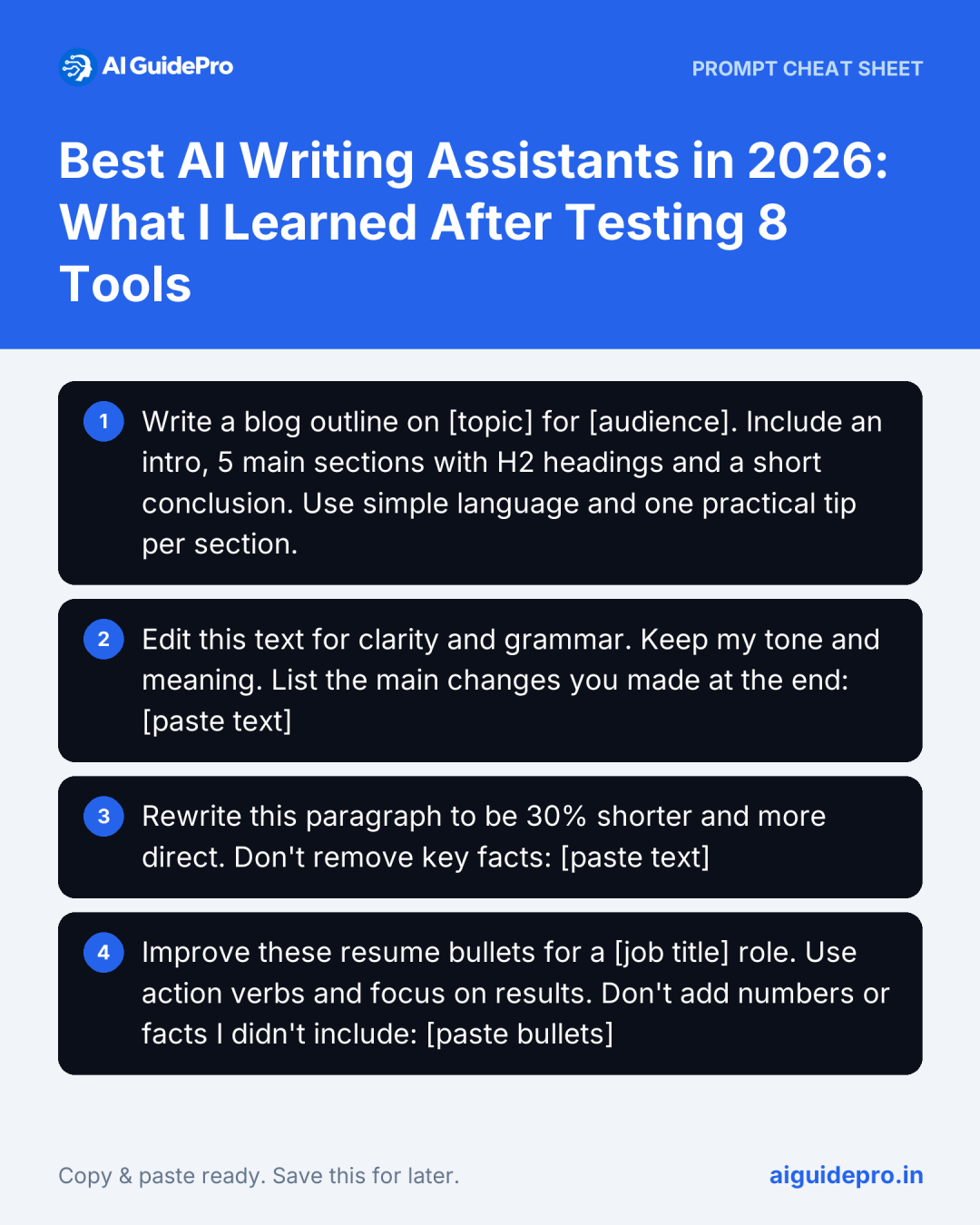
Blog outline
Write a blog outline on [topic] for [audience]. Include an intro, 5 main sections with H2 headings and a short conclusion. Use simple language and one practical tip per section.Editing
Edit this text for clarity and grammar. Keep my tone and meaning. List the main changes you made at the end: [paste text]Rewriting
Rewrite this paragraph to be 30% shorter and more direct. Don't remove key facts: [paste text]Resume bullets
Improve these resume bullets for a [job title] role. Use action verbs and focus on results. Don't add numbers or facts I didn't include: [paste bullets]That last line, “don’t add facts I didn’t include”, is the most useful thing you can add to any writing prompt. More templates are in our free Writing Starter Kit.
Accuracy: The Weakest Area
Across the tests I saw made-up statistics, outdated product details, wrong dates and resume achievements I never mentioned, all written with the same confidence as the correct parts. Before you publish or send anything:
- Highlight every fact, number and name, and confirm each one with a trusted source.
- Use official sources for anything current: prices, laws, news and statistics.
- Remove anything you can’t verify.
- Ask the tool, “Which claims here might be uncertain?”
Editing AI Drafts and Keeping Your Voice
AI drafts are usually well organized but flat. Short emails and rewrites needed a few minutes of editing; blog posts and cover letters needed heavy editing, because the parts that make writing worth reading (your examples, opinions and stories) aren’t things AI can supply.
- Start with your own ideas before opening any tool.
- Give the tool a sample of your writing and ask it to match the style.
- Rewrite the opening, the ending and any stiff line.
- Never publish an unreviewed draft.
For a fuller guide, see how to use AI without losing your authentic voice, and for the bigger picture in news writing, whether AI writing assistants are the future of journalism.
My Takeaways
ChatGPT was the strongest all-rounder and Grammarly the best editor; Copilot and Notion AI shine inside their own apps. Clear instruction-following and easy editing mattered far more than long feature lists. Pick one AI writer, learn to write good prompts, and check every draft.