Introduction
Writing a discharge summary at the end of a long shift feels like climbing stairs with tired legs. You know the steps, but every one takes effort. A ChatGPT patient discharge summary can lighten that load. In this guide from AI Guide Pro, you’ll learn how to do it safely, quickly, and accurately.
What Is a Patient Discharge Summary?
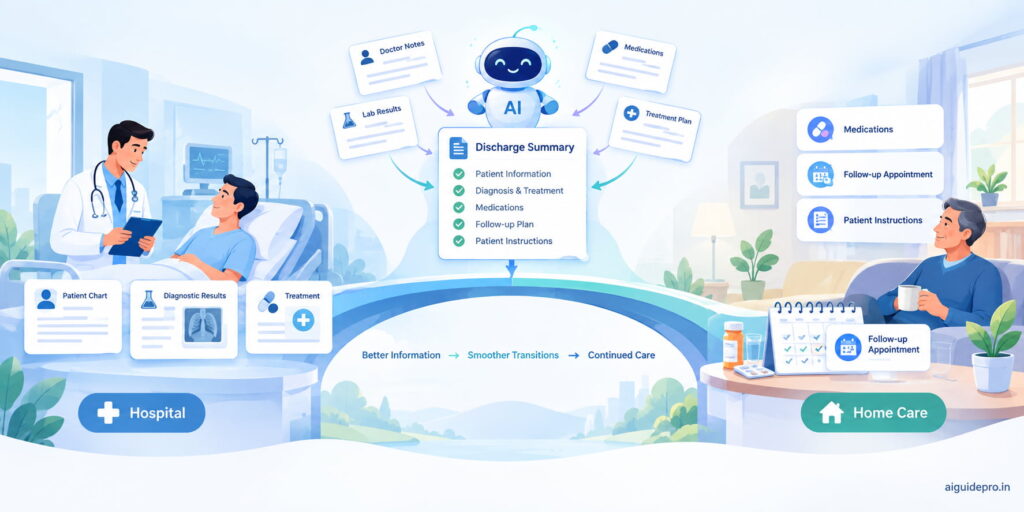
A patient discharge summary is a short medical document written when a patient leaves the hospital. Think of it as the final chapter of a hospital stay. It tells the story of what happened, from the day the patient arrived to the day they went home.
A good summary answers a few simple questions. Why did the patient come in? What did the doctors find? What treatment did they get? How are they doing now? And what should happen next?
This document goes to several people. The patient’s family doctor reads it to continue care. The patient keeps a copy to understand their own health. Other specialists may use it later as a reference.
In most hospitals, the treating doctor writes and signs the summary. Nurses, junior doctors, and medical records staff often help collect the details. The summary usually follows a fixed format, so anyone can pick it up and find what they need fast.
In short, it’s a bridge. It connects hospital care to home care, so nothing important falls through the gap.
Why Do We Need It?
Imagine handing someone a car without telling them it just had brake repairs. They might drive it the wrong way. The same thing happens when a patient leaves hospital without a clear summary.
Here’s why the discharge summary matters so much:
- It keeps care continuous. The family doctor knows exactly what happened and what to watch for.
- It prevents medicine mistakes. Patients often leave with new drugs, changed doses, or stopped medicines. The summary makes these changes clear.
- It helps patients understand their health. A clear summary tells them what to do, what to avoid, and when to come back.
- It reduces readmissions. When patients follow the right plan, they are less likely to return with the same problem.
- It serves as a legal record. Hospitals must keep accurate records of care. The summary is one of the most important ones.
- It helps with insurance claims. Insurers often ask for the discharge summary before they approve payment.
Without it, the next doctor works in the dark. With it, everyone involved in the patient’s care is on the same page.
Can ChatGPT Write a Patient Discharge Summary?
Before we answer, it helps to see the bigger picture. AI tools are now part of daily clinical work. If you want to see how widely they’re used, this guide on AI for Doctors covers the tools physicians rely on today.
Yes, ChatGPT Can Write a Discharge Summary
ChatGPT can turn rough clinical notes into a clean, well-organized summary in seconds. You give it the facts. It arranges them into clear sections with plain language.
But here’s the key point. ChatGPT is a writing assistant, not a doctor. It can’t examine the patient. It doesn’t know the case unless you tell it. And it can sometimes make mistakes or fill gaps with guesses. So a qualified clinician must always check and approve the final document.
How ChatGPT Helps (Simple View)
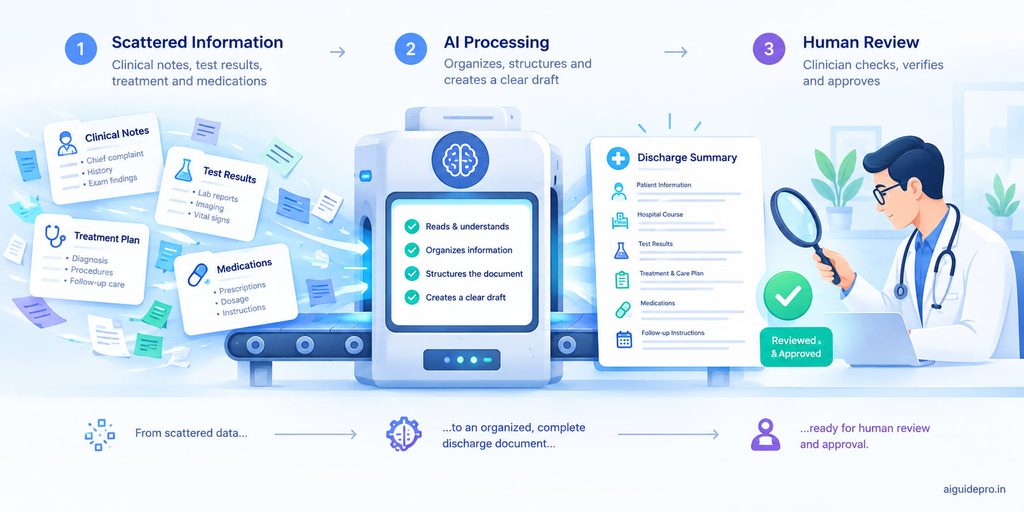
Think of ChatGPT as a skilled typist who also knows medical formatting. Here’s the simple flow:
- You provide the key facts: diagnosis, tests, treatment, medicines, and follow-up plan.
- ChatGPT organizes them into a standard structure.
- ChatGPT rewrites the content in clear language for doctors or patients.
- You review, correct, and sign off.
You stay in charge of the medicine. ChatGPT handles the heavy lifting of the writing.
Benefits of Using ChatGPT for Discharge Summaries
An AI discharge summary isn’t about replacing clinical judgment. It’s about removing the slow, repetitive parts of the job. Here are the main benefits.
Saves time
Writing a summary from scratch can take 15 to 30 minutes. With ChatGPT, a first draft takes seconds. You spend your time checking, not typing. Across a busy ward with many discharges a day, that adds up to hours saved every week.
Keeps information organized
Clinical notes are often scattered. Lab results sit in one place, progress notes in another, and medicine charts somewhere else. ChatGPT pulls these pieces into neat, labeled sections. The same idea powers tools for AI SOAP Notes, where AI helps nurses turn messy notes into clear, structured records.
Makes language easier
Medical terms confuse most patients. ChatGPT can rewrite “acute exacerbation of COPD” as “a sudden flare-up of your lung condition.” This helps patients actually understand what happened to them.
Helps explain next steps
Patients often forget instructions the moment they leave. ChatGPT can create simple, numbered lists: when to take medicines, what warning signs to watch for, and when to see the doctor again.
Improves consistency
When different staff write summaries, the style and order vary. Using the same template and prompt in ChatGPT keeps every summary in the same format. That makes them easier to read and audit.
Supports junior staff
New doctors and nurses may not know what a strong summary looks like yet. ChatGPT can act like a patient tutor. It shows them a clear structure and points out missing sections. Over time, they learn good habits faster.
How to Use ChatGPT to Write a Discharge Summary
Now let’s get practical. Follow these steps in order, and you’ll get a reliable ChatGPT discharge summary every time.
Before you start: safety rules
Treat patient data like cash in your pocket. You don’t leave it lying around. Before you open ChatGPT, follow these rules:
- Remove identifying details. Don’t enter names, addresses, phone numbers, hospital ID numbers, or exact dates of birth. Use placeholders like “[Patient Name]” or “45-year-old male.”
- Check your hospital’s policy. Many hospitals only allow approved, secure AI tools. Use those if available.
- Never skip clinical review. The AI draft is a starting point, not a final document.
- Don’t use it for decisions. ChatGPT should write up decisions already made by the care team, not make new ones.
Step 1 – Gather the key information
Good output starts with good input. Before you write a prompt, collect these details:
- Age and sex (no names)
- Admission and discharge dates (or length of stay)
- Reason for admission
- Main and secondary diagnoses
- Key test results
- Procedures or treatments given
- Condition at discharge
- Discharge medicines with doses
- Follow-up plan and warning signs
Write them as short bullet points. You don’t need perfect grammar. ChatGPT will tidy it up.
Step 2 – Write a simple prompt for ChatGPT
A prompt is just your instruction. Keep it clear and specific. Here’s a basic example:
“You are a clinical documentation assistant. Using only the notes below, write a discharge summary with these headings: Patient Details, Reason for Admission, Diagnosis, Investigations, Treatment Given, Condition at Discharge, Discharge Medications, Follow-Up Plan. Do not add any information that is not in the notes. If something is missing, write ‘Not provided.’
Notes: [paste your bullet points here]”
That last line matters most. It stops ChatGPT from inventing details.
Step 3 – Ask for the style you need
Different readers need different versions. You can ask ChatGPT for:
- A clinical version for the family doctor, using standard medical terms.
- A patient-friendly version at a simple reading level.
- A short version of under 200 words for quick handovers.
- A translated version in the patient’s preferred language, which a fluent staff member should then check.
Just add a line such as, “Now rewrite this for the patient in simple English, at a 6th-grade reading level.”
Step 4 – Review and edit carefully
This is the most important step. Read the draft line by line against the original notes. Check:
- Are all diagnoses correct?
- Do medicine names, doses, and timings match exactly?
- Did ChatGPT add anything that wasn’t in your notes?
- Are follow-up dates and instructions accurate?
Fix any errors, add the real patient details back in your hospital system, and then sign off. Think of yourself as the pilot. ChatGPT is the autopilot, but you land the plane.
What Information Should a Discharge Summary Include?
A complete patient discharge summary covers the full journey of the hospital stay. Here’s what each section should contain.
Who the patient is
Basic details that identify the patient: name, age, sex, hospital number, and contact details. Add these inside your secure hospital system, not in ChatGPT. In the AI draft, use placeholders.
When and where they were treated
The admission date, discharge date, ward or department, and name of the treating consultant. This tells the reader the timeline and who was in charge.
Why they came to hospital
The main complaint in simple terms. For example, “Admitted with chest pain and shortness of breath for two days.” Include brief relevant history, such as known diabetes or high blood pressure.
What was found
The final diagnosis, plus any secondary conditions found during the stay. Include key test results that support the diagnosis, like blood reports, scans, or ECG findings. Only list what matters. A wall of numbers helps no one.
What was done in hospital
Treatments, procedures, and surgeries performed. Mention important events, like a transfer to ICU or a reaction to a medicine. Keep it short but clear, like a news summary rather than a diary.
How the patient is at discharge
The patient’s condition when leaving. For example, “Stable, walking without help, eating normally, pain controlled.” This gives the next doctor a starting point for comparison.
Medicines to take now
This is the section where mistakes cause the most harm. List each medicine with:
- Name (preferably generic)
- Dose
- How often to take it
- How long to take it
- Any changes from medicines taken before admission (new, changed, or stopped)
What to do next (follow-up plan)
Clear next steps for the patient and the family doctor. Include follow-up appointment dates, tests to repeat, diet or activity advice, and warning signs that need urgent care. For example, “Return to hospital immediately if chest pain comes back or breathing gets worse.”
Who wrote the summary
The name, designation, and signature of the doctor who prepared and approved the summary, plus the date. This adds accountability and gives the next doctor someone to contact with questions.
Best ChatGPT Prompts for Discharge Summaries
ChatGPT is just one type of tool among many AI Writing Assistants that help with structured writing and summaries. But no matter which tool you pick, the quality of your prompt shapes the quality of the result.
Simple rule for good prompts
| Rule | What It Means | Example |
|---|---|---|
| Give a role | Tell ChatGPT who to act as | “You are a clinical documentation assistant.” |
| Give the task | Say exactly what you want | “Write a discharge summary.” |
| Give the format | List the headings you need | “Use these headings: Diagnosis, Treatment…” |
| Set limits | Stop it from guessing | “Use only the notes provided. Don’t add facts.” |
| Set the reader | Say who will read it | “Write for a family doctor.” |
| Set the length | Control the size | “Keep it under 300 words.” |
Best main prompt
This all-in-one prompt works well for most cases:
“You are a clinical documentation assistant helping a hospital doctor. Using ONLY the de-identified notes below, write a clear patient discharge summary. Use these headings: Patient Details, Admission and Discharge Dates, Reason for Admission, Diagnosis, Key Investigations, Treatment Given, Condition at Discharge, Discharge Medications (name, dose, frequency, duration), Follow-Up Plan, Warning Signs. Use clear, professional language. Do not invent or assume any information. If a section has no data, write ‘Not provided.’ At the end, list anything that seems unclear or missing.
Notes: [paste notes]”
Prompts for common tasks
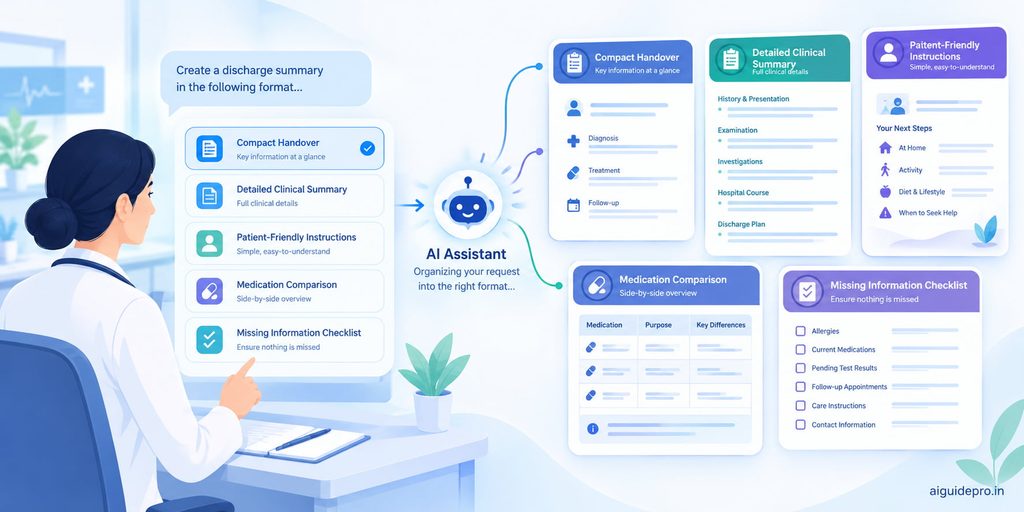
1. Short discharge summary
“Using only the notes below, write a short discharge summary of under 150 words for a quick handover. Include diagnosis, key treatment, discharge medicines, and follow-up. Notes: [paste notes]”
2. Full discharge summary
“Using only the notes below, write a complete, detailed discharge summary for the patient’s family doctor. Use standard medical terms and include all relevant investigations and treatment details. Notes: [paste notes]”
3. Patient-friendly instructions
“Rewrite the discharge plan below for the patient in simple English at a 6th-grade reading level. Use short sentences and bullet points. Explain what each medicine is for, when to take it, what activities to avoid, and which warning signs mean they should come back to hospital right away. Plan: [paste plan]”
4. Medication safety check
“Compare the admission medicine list and the discharge medicine list below. Make a table showing which medicines are new, changed, continued, or stopped. Flag any possible duplicates or unclear doses for a doctor to review. Do not give clinical advice. Admission list: [paste]. Discharge list: [paste]”
5. Find missing discharge items
“Review the draft discharge summary below. List any standard sections that are missing or incomplete, such as follow-up plan, condition at discharge, medicine duration, or warning signs. Do not fill in the missing information yourself. Draft: [paste draft]”
Save these prompts in a document so you can reuse them. Over time, tweak them to match your hospital’s format.
How to Make ChatGPT Discharge Summaries More Accurate
ChatGPT is like a mirror. It reflects what you give it. Feed it clear, correct information, and the result shines. Feed it messy notes, and you get a messy draft. Here’s how to improve accuracy.
Start with correct information
Double-check your notes before you paste them. Make sure the diagnosis is final, test results are up to date, and the medicine list is the one actually prescribed at discharge. A small error going in becomes a confident-sounding error coming out.
Use a clear template
Give ChatGPT the exact headings your hospital uses. A fixed template keeps the AI on track and stops it from wandering. If your hospital follows a standard format, paste that structure into your prompt every time.
Check medicines very carefully
Medicine errors are the biggest risk. ChatGPT can mix up similar drug names, change a dose, or swap “twice daily” for “once daily.” Compare every line against the prescription. If something looks off, trust the chart, not the AI.
Ask for simple language
Plain words leave less room for confusion. Ask ChatGPT to avoid unexplained abbreviations. For example, “BD” and “TDS” are clear to doctors but can confuse patients. A line like “Spell out all abbreviations” in your prompt fixes this.
Review before sharing
Never send an AI draft straight to a patient or another doctor. Read it fully. Better still, ask a colleague to check summaries for complex cases. You can also ask ChatGPT, “List any statements in this summary that are not supported by the original notes.” It’s a helpful extra check, but your own review is what counts.
Privacy and Patient Data Safety
Patient information is some of the most private data there is. Using AI responsibly means protecting it at every step.
Public AI tools may store or process what you type on outside servers. That’s why you should never paste identifiable patient details into a regular ChatGPT account. This includes names, phone numbers, addresses, ID numbers, photos, and exact dates of birth.
Follow these simple practices:
- De-identify first. Replace personal details with placeholders before using ChatGPT.
- Use approved tools. Many hospitals offer enterprise AI versions with stronger data protection. Ask your IT or compliance team what’s allowed.
- Know the law. Data protection laws apply to health records. In India, the Digital Personal Data Protection Act sets rules for handling personal data. In the US, HIPAA applies. Your hospital’s policy should reflect these rules.
- Turn off chat history if possible. Check your settings so conversations aren’t saved or used for training.
- Add real details only in secure systems. Put patient identifiers back in your hospital’s own records software, not in the AI tool.
- Get consent where required. Some hospitals require patients to know when AI tools help with their documentation.
Think of it this way. ChatGPT gets the story, but never the patient’s identity card. If you want to keep learning about using AI safely and smartly, explore more AI Guides on our blog.
Common Mistakes to Avoid
Even experienced users slip up. Here are the most common mistakes and how to steer clear of them.
1. Copying the draft without checking it. This is the biggest risk. AI can sound confident even when it’s wrong. Always review every line.
2. Pasting identifiable patient data. It feels faster, but it puts privacy at risk and may break hospital rules or the law. De-identify first, every time.
3. Giving vague prompts. “Write a discharge summary” alone leaves ChatGPT guessing. Give a role, headings, limits, and the reader.
4. Letting ChatGPT fill gaps. If your notes are missing a detail, the AI may invent one. Always tell it to write “Not provided” instead of guessing.
5. Trusting medicine details blindly. Doses, frequencies, and durations must match the prescription exactly. One wrong digit can cause real harm.
6. Using too much jargon in patient copies. A summary that patients can’t understand doesn’t help them. Ask for a separate, simple version.
7. Asking ChatGPT for clinical decisions. It’s a writing tool. Diagnosis and treatment choices belong to the care team.
8. Ignoring the hospital’s format. If your summaries don’t match the required template, they may fail audits. Build your template into your prompt.
Avoid these, and your AI-assisted summaries will be faster, safer, and more reliable.
FAQ
How to write a patient discharge summary?
Start by collecting the key facts: reason for admission, diagnosis, tests, treatment, condition at discharge, medicines, and follow-up plan. Organize them under clear headings. Use simple, precise language. Finally, have the treating doctor review, sign, and date the summary. ChatGPT can help draft it quickly from de-identified notes.
How to write patient discharge instructions?
Keep them short and simple. Use bullet points. Explain each medicine, when to take it, and why. List activity and diet limits, follow-up appointments, and warning signs that need urgent care. Write at a 6th- to 8th-grade reading level, and avoid abbreviations. ChatGPT’s patient-friendly prompt works well here.
What is the format of a NABH discharge summary?
NABH (National Accreditation Board for Hospitals & Healthcare Providers) expects a discharge summary to include the reason for admission, significant findings, investigation results, final diagnosis, procedures performed, treatment given, condition at discharge, discharge medicines, follow-up advice, and instructions on when and how to get urgent care. It should be signed by the treating doctor and a copy given to the patient. Check your hospital’s latest NABH-aligned template for exact requirements.
Can I create a discharge summary online?
Yes. You can use ChatGPT or other AI tools to draft a summary online, or use your hospital’s electronic health record system. Just never enter identifiable patient details into public tools. Draft with de-identified notes, then finalize the summary inside your secure hospital system.
Final Thoughts
A ChatGPT discharge summary won’t replace a careful clinician, and it shouldn’t. But it can take the heavy lifting off your plate. Gather good notes, use a clear prompt, protect patient privacy, and review every draft. Do that, and you’ll write better summaries in less time, giving you more of what matters most: time with your patients.