Most cold emails get deleted in under three seconds. Not because the offer is bad, but because the email sounds like every other template in the inbox. ChatGPT can help you write cold emails that are short, specific and personal, if you give it the right inputs. This guide gives you 15 copy-paste ChatGPT prompts for cold emails, 5 proven templates, and a simple process to get more replies without sounding like a robot.
Who wrote this: I’m a software developer who has written and received plenty of cold emails for freelance and SaaS work. These prompts are what I actually use. Results depend on your list, offer and timing, so treat any “reply rate” claim online, including mine, as a rough guide.
What Makes a Cold Email Get a Reply?
Before you open ChatGPT, know what you are asking it to produce. Emails that get replies usually share five traits:
| Trait | What it means | Why it matters |
|---|---|---|
| Short | 50 to 125 words | People read email on their phone between meetings |
| Personal first line | Something true about them, not you | Proves it isn’t a mass blast |
| One clear problem | A pain they likely have right now | Relevance beats clever copy |
| Proof | One result, client or number | Builds trust fast |
| Low-friction ask | “Worth a quick chat?” not “Book 30 minutes” | Small yeses are easier |
AI is great at the writing part. It is not great at knowing facts about your prospect, so you supply the research and ChatGPT shapes it into a tight email.
The Inputs ChatGPT Needs (Copy This Brief)
Paste this brief at the top of any prompt below. It takes two minutes to fill in and makes every output dramatically better.
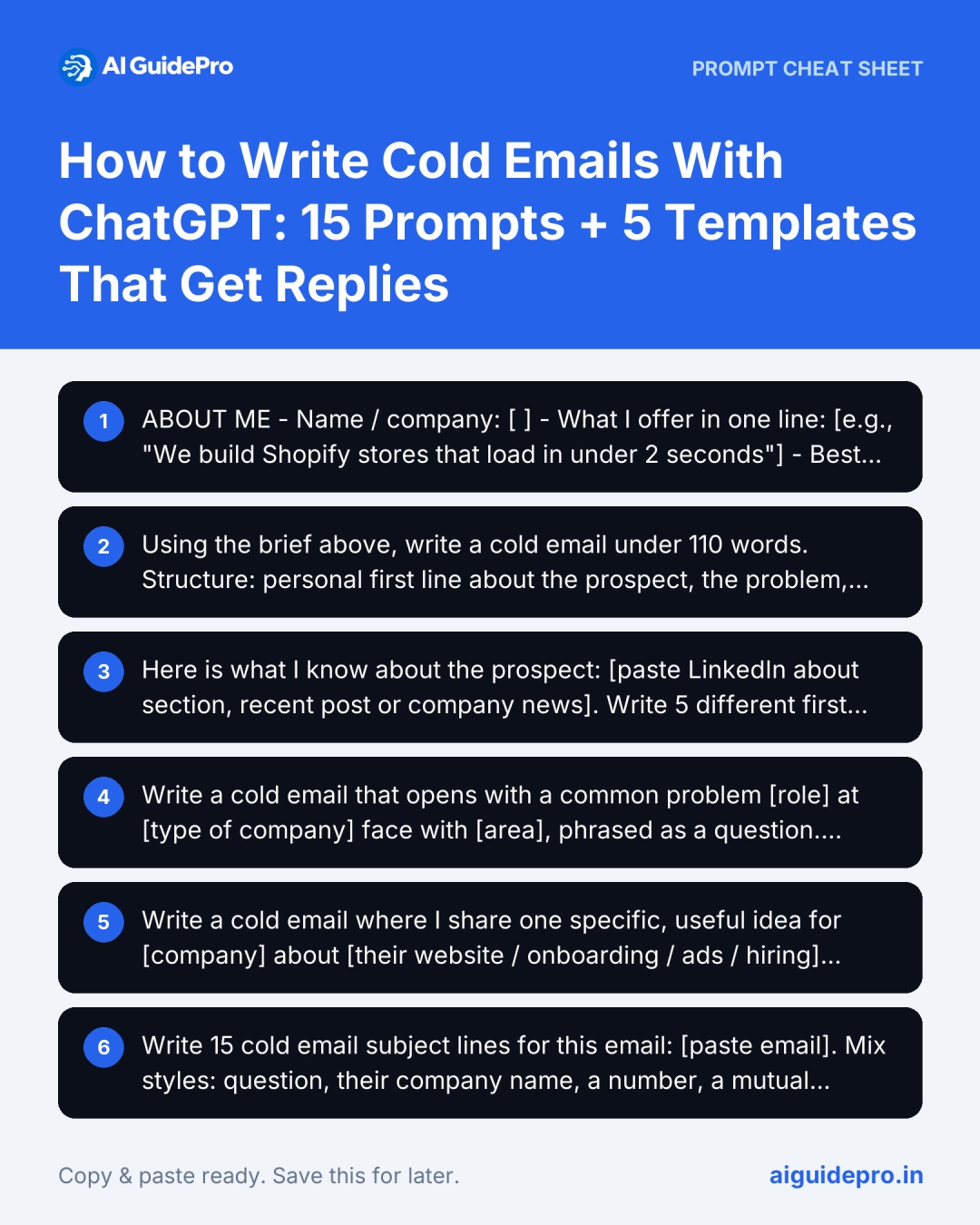
ABOUT ME
- Name / company: [ ]
- What I offer in one line: [e.g., "We build Shopify stores that load in under 2 seconds"]
- Best proof: [e.g., "Helped Brand X cut bounce rate 31%"]

ABOUT THE PROSPECT
- Name, role, company: [ ]
- What they do: [ ]
- Something specific I noticed: [recent post, hire, launch, funding, review]
- Likely problem I can solve: [ ]

GOAL
- What I want: [reply / 15-minute call / permission to send a sample]
- Tone: [friendly and direct / formal]
Prefer a form? Our free Email Prompt Generator has a cold email mode that builds this brief for you.
15 ChatGPT Prompts for Cold Emails
Writing the First Email
1. The Core Cold Email Prompt
Using the brief above, write a cold email under 110 words.
Structure: personal first line about the prospect, the problem, one line of proof, a soft question as the call to action.
No buzzwords ("synergy", "leverage", "revolutionize"), no "I hope this email finds you well", no exclamation marks.
Give me 3 subject lines under 5 words each.
2. Personalised Opening Lines
Here is what I know about the prospect: [paste LinkedIn about section, recent post or company news].
Write 5 different first lines for a cold email that reference something specific and true from this, in under 20 words each.
Do not flatter or exaggerate. Do not invent facts that aren't in my notes.
Important: AI will happily invent “I loved your talk at…” if you let it. The prompt above tells it to use only what you paste. Always check the opening line is true.
3. Problem-First Email
Write a cold email that opens with a common problem [role] at [type of company] face with [area], phrased as a question.
Then show how I solve it in one sentence, add my proof, and end with a yes/no question. Max 90 words.
4. The “Quick Idea” Email
Write a cold email where I share one specific, useful idea for [company] about [their website / onboarding / ads / hiring], based on this observation: [what you noticed].
The idea should be actionable even if they never hire me. End by offering to share 2 more ideas. Under 120 words.
5. Subject Lines That Get Opened
Write 15 cold email subject lines for this email: [paste email].
Mix styles: question, their company name, a number, a mutual connection, "quick question".
All lowercase or sentence case, under 6 words, no clickbait or spam trigger words (free, guarantee, urgent).
Follow-Ups (Where Most Replies Come From)
Many replies arrive on the second to fourth touch. These prompts keep follow-ups short and useful instead of “just bumping this”.
6. Follow-Up Sequence
Here is my first cold email: [paste].
Write 3 follow-ups to send 3, 7 and 14 days later. Each must add something new (a case study, a quick tip, a relevant question) and be under 60 words.
The last one should be a polite "closing the loop" email that makes it easy to say no.
7. The Value-Add Follow-Up
Write a follow-up that shares a free resource relevant to [prospect's problem]: [link or description].
No guilt ("I haven't heard back"). Under 50 words.
8. The Breakup Email
Write a short, friendly last email to a prospect who hasn't replied to 3 emails.
Give them easy options: "not interested", "not now, try in [month]" or "talk to [someone else]". Under 50 words.
Personalising at Scale
9. Batch Personalisation
For each prospect below, write one personalised first line (under 20 words) based only on the notes given. Return a table: Name | Company | First line.
[Name, company, notes]
[Name, company, notes]
...
Tip: Do 10 to 15 rows at a time and spot-check every line. Then paste the first lines into your email tool’s custom field.
10. Industry Variations
Rewrite this cold email for 4 different industries: [list industries].
Change the problem, example and proof to fit each industry. Keep the same length and structure.
[paste email]
11. Persona Variations
Rewrite this email for 3 different job titles at the same company: [e.g., CEO, Head of Marketing, Operations Manager].
Each version should focus on what that person cares about most. [paste email]
Improving and Testing
12. Brutal Critique
Act as a busy [prospect role] who receives 50 cold emails a day. Read this email and tell me honestly:
1) Would you reply? Why or why not?
2) Which sentence would make you stop reading?
3) Rewrite it to be 30% shorter and more relevant.
[paste email]
13. Spam and Tone Check
Check this cold email for spam-trigger words, pushy language, too many links, and anything that sounds automated. List problems, then give a cleaned-up version. [paste email]14. A/B Test Variants
Create 2 variants of this email for an A/B test. Change only ONE element: [subject line / first line / call to action]. Explain what each variant tests. [paste email]15. Reply Handling
A prospect replied: "[paste reply]". Write a short, helpful response that answers their point and moves toward [goal] without being pushy. Under 80 words.5 Cold Email Templates You Can Adapt
These are starting points. Run any of them through prompt 1 or 12 with your own brief.
Template 1: The Observation
Subject: {Company}'s checkout

Hi {First name},

Noticed {Company}'s checkout takes 4 steps on mobile. Stores we've worked with usually lose a lot of buyers there.

We cut {Client}'s mobile checkout to 2 steps and their conversions rose 18% in a month.

Worth sharing what we changed?

{Your name}
Template 2: The Quick Idea
Subject: idea for {Company}'s onboarding

Hi {First name},

Signed up for {Product} yesterday. One idea: the welcome email doesn't link to the setup guide, so new users have to hunt for it.

Adding one button there is a 10-minute fix that usually lifts activation.

I have two more ideas like this. Want them?

{Your name}
Template 3: The Mutual Connection
Subject: {Mutual name} suggested I reach out

Hi {First name},

{Mutual name} mentioned you're hiring {role} and finding it slow.

We help {type of company} fill {role} roles in about 3 weeks. Most recently for {Client}.

Open to a 15-minute call next week?

{Your name}
Template 4: The Case Study
Subject: how {Client} saved 12 hours a week

Hi {First name},

{Client}, also a {industry} team, was spending 12 hours a week on {task}. We automated it in 2 weeks.

Guessing {Company} deals with something similar as you grow?

Happy to send the 1-page case study.

{Your name}
Template 5: The Breakup
Subject: should I close your file?

Hi {First name},

I haven't heard back, so I'll assume {problem} isn't a priority right now. Totally fine.

If that changes, just reply "later" and I'll check in next quarter.

{Your name}
Best Practices (So Your Emails Actually Land)
- Send from a warmed-up domain and set up SPF, DKIM and DMARC. Without them, even perfect emails land in spam.
- Send in small batches, not hundreds at once from a new account.
- Keep links to one (or zero) in the first email.
- Make it easy to opt out and honour requests. Laws such as CAN-SPAM in the US and GDPR in the EU and UK set rules for commercial email, so check what applies to you.
- Never paste sensitive customer data into AI tools. Use names and public info only.
- Track replies, not just opens. Open tracking is unreliable now that many email apps preload images.
Common Mistakes When Using ChatGPT for Cold Emails
- Using the output without editing. AI emails often open with “I came across your profile and was impressed”. Delete that line every time.
- Letting it invent personalisation. Fake compliments get spotted instantly and can damage your reputation.
- Writing too long. If it scrolls on a phone, it’s too long.
- Asking for too much. “Book a 45-minute demo” in email one rarely works.
- Same email for everyone. Use prompts 9 to 11 to vary by industry and role.
Want more ready-made sales and marketing prompts? Try the Marketing Prompt Generator and Copywriting Prompt Generator, or the Sales & Customer Success AI Starter Kit. If you’re comparing AI tools for your inbox, see our guide to AI customer service agents for small businesses.
Frequently Asked Questions
Can ChatGPT write cold emails that actually work?
Yes, when you give it real research about the prospect and a clear offer. It handles structure, brevity and tone well. It can’t know facts about your prospect, so the personalisation has to come from you.
How long should a cold email be?
Most effective cold emails are roughly 50 to 125 words: short enough to read on a phone in a few seconds.
How many follow-ups should I send?
Two to four follow-ups spaced a few days apart is common. Each one should add something new, and the last should make it easy to say no.
Is it legal to send cold emails?
In many countries, yes, if you follow the rules. For example, the US CAN-SPAM Act requires an accurate sender, a non-deceptive subject and a way to opt out, while GDPR and UK rules are stricter for some contacts. This isn’t legal advice; check the rules where you and your recipients are.
Which AI is best for cold emails: ChatGPT, Claude or Gemini?
All three handle these prompts well. Claude tends to write in a more natural tone, ChatGPT is good at fast variations, and Gemini works well if your prospect research lives in Google Workspace. Try the same prompt in two and keep the better one.
Final Thoughts
Good cold emails are short, specific and about the reader. ChatGPT can turn your research into a polished email in seconds, write follow-ups that add value, and help you test what works. Fill in the brief, start with prompt 1, critique the result with prompt 12, and always check every personal detail before you hit send.