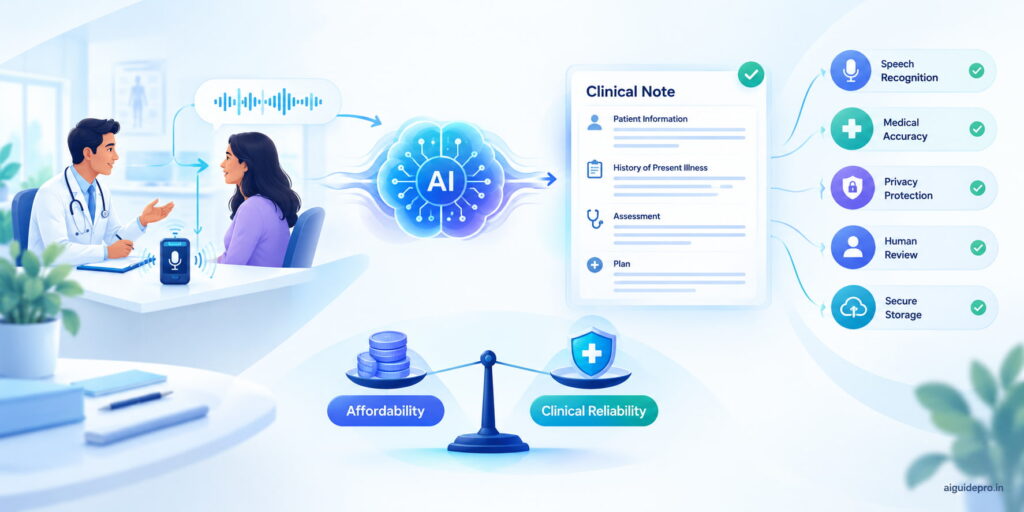
AI medical transcription can turn a recorded consultation or dictated note into editable text in minutes, giving clinicians time back for patient care. The hard part is finding affordable medical transcription software that still handles drug names, clinical terms and patient privacy well.
We compared three budget options: TurboScribe, Ditto Transcripts and PlainScribe. Each was judged on price, accuracy, medical terminology, usage limits, ease of use and HIPAA readiness.
1. Quick Answer: Which AI Medical Transcription Tool Is Best?
| Need | Best pick | Price |
|---|---|---|
| Best overall value under $20/month | TurboScribe | $20/month, or $10/month billed annually ($120) |
| Medical-focused transcription with human editing | Ditto Transcripts | From $0.10 per 65-character line |
| Occasional, pay-as-you-go transcription | PlainScribe | $4 per audio hour |
TurboScribe is the closest match for a fixed $20 monthly budget. Ditto bills by volume and adds human editors, while PlainScribe suits people who don’t transcribe every month.
2. What Is AI Medical Transcription?
AI medical transcription uses speech recognition to convert spoken medical information into written text. A doctor, nurse or researcher records a consultation, dictates notes or uploads an existing file, and the software returns a transcript.
Modern tools can label speakers, add timestamps, handle multiple languages and make long recordings searchable. Some are built for healthcare; others are general speech-to-text tools that can also process medical audio.
For example, Ditto Transcripts’ medical transcription service pairs AI with human editors. For a deeper look at the technology, see our guide to AI transcription.
AI should speed up documentation, not replace professional judgment.
3. Benefits of AI Medical Transcription Tools
Saves time on clinical documentation
Medical dictation software converts speech into editable text automatically. Clinicians spend their time reviewing a draft instead of typing every note from scratch.
Produces accurate first drafts
With clear audio, AI transcription creates usable drafts quickly. Accuracy drops with background noise, strong accents, overlapping speakers and dense terminology, so medication names, dosages, diagnoses, allergies and test results always need human review.
Makes records easier to search and manage
Digital transcripts are easier to search, edit, organize and store than handwritten notes. Speaker labels and timestamps make long recordings quick to navigate.
Improves productivity
Removing repetitive typing frees time for patient care, administrative work and higher-value tasks.
4. How We Evaluated the Best AI Medical Transcription Software
The cheapest tool is not automatically the best for medical work, so we scored each option on seven factors.
| Factor | What we checked |
|---|---|
| Price | Realistic use on $20 or less; subscription vs pay-as-you-go vs per-line billing |
| Accuracy | Performance on clear speech and how easy errors are to correct |
| Medical terminology | Dedicated medical support vs general-purpose transcription |
| Ease of use | Upload, transcribe, review and export without a learning curve |
| Features | Speaker labels, timestamps, languages, summaries, exports, privacy controls |
| Usage limits | File length, free limits, upload capacity |
| Privacy and HIPAA | PHI handling, data retention, access controls, BAA availability |
5. Best AI Medical Transcription Tools Under $20/Month
No single tool fits every workflow. The right choice depends on your audio volume, whether recordings contain protected health information (PHI), whether you need human review, and whether you prefer a subscription or pay-as-you-go.
5.1 TurboScribe: Best Overall Value Under $20/Month
Best for: fast, high-volume AI transcription on a fixed budget.
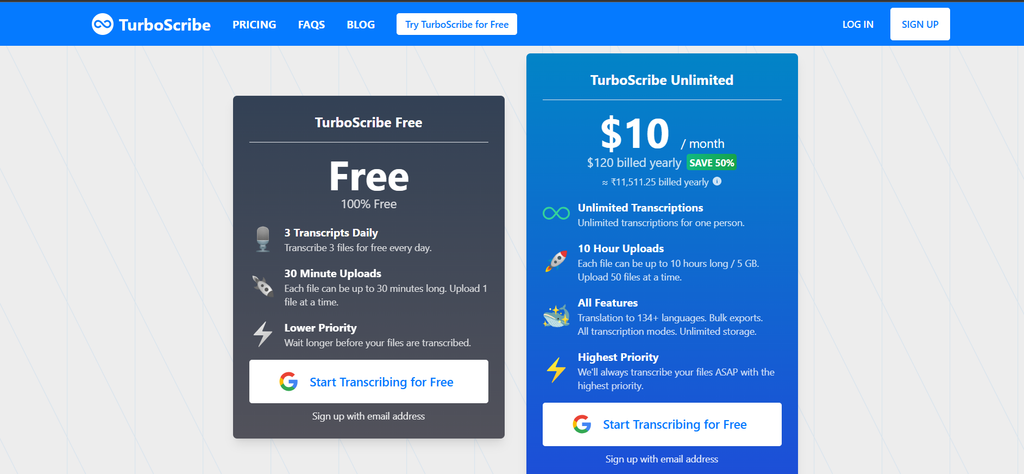
Pricing. The free plan allows three transcripts per day, up to 30 minutes each. The Unlimited plan costs $20/month, or $10/month billed annually at $120, and accepts files up to 10 hours or 5 GB with up to 50 uploads at once (TurboScribe pricing).
Key features. Unlimited transcription for one user, translation into 134+ languages, bulk exports and unlimited storage.
Medical use. Treat every transcript as a draft. Check drug names, dosages, test values and similar-sounding words before they reach a patient record.
Workflow: Upload → Transcribe → Review → Correct → Export.
Privacy. Before uploading identifiable patient data, confirm that the plan, account settings and contract meet your HIPAA and BAA requirements.
| Pros | Cons |
|---|---|
| Fits a $20 monthly budget; free tier available | Medical output still needs human review |
| Unlimited transcription on the paid plan | Specialist terms may need correction |
| 10-hour / 5 GB files, bulk upload | You must verify HIPAA and BAA terms yourself |
| Translation into 134+ languages |
Verdict: TurboScribe is the best overall value because its $20 plan matches a monthly budget most directly.
5.2 Ditto Transcripts: Best for Medical Accuracy and Human Editing
Best for: healthcare organizations that need medical-grade transcription with human editors.
Ditto is a professional service rather than a self-service app. It handles SOAP notes, consultations, chart notes, procedure notes, operative reports, progress notes and discharge summaries (Ditto medical transcription).
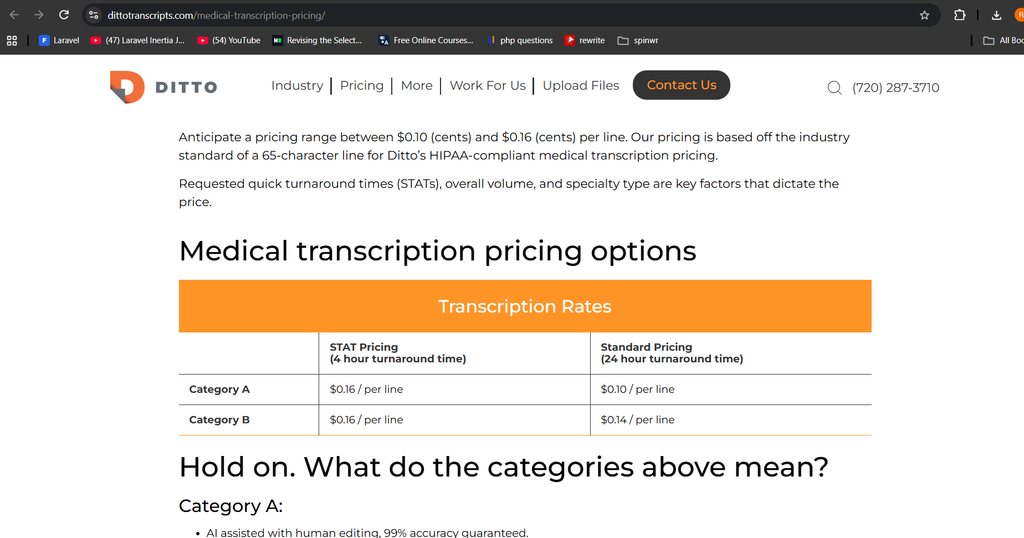
Pricing. Billing uses a 65-character line. Category A (AI-assisted, human-edited) costs $0.10/line standard or $0.16/line STAT. Category B (human transcription) costs $0.14/line standard or $0.16/line STAT. EHR/EMR and LIS/PACS flat rates run $0.25 to $3 per report. Light use can stay under $20, but there is no fixed monthly allowance.
Accuracy. Both Category A and Category B carry a published 99% accuracy guarantee.
Medical terminology. Ditto’s transcriptionists have EHR and EMR experience, making it the most healthcare-focused option here.
Privacy. Ditto describes its medical service as HIPAA compliant. Still confirm the contract, BAA and security terms fit your organization.
| Pros | Cons |
|---|---|
| Strong medical focus, EHR/EMR experience | No fixed under-$20 monthly plan |
| AI + human editing, or fully human option | Cost scales with transcription volume |
| 99% accuracy guarantee | Not an instant DIY app |
| Describes service as HIPAA compliant |
Verdict: Ditto is the strongest choice for clinical documentation, as a usage-based service rather than a monthly plan.
5.3 PlainScribe: Best Pay-As-You-Go Medical Transcription
Best for: occasional transcription without a subscription.
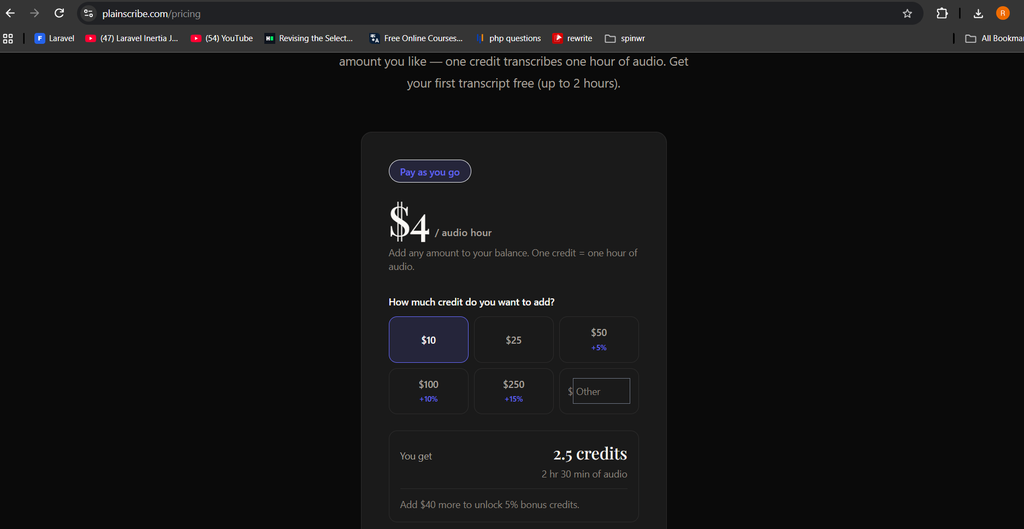
Pricing. $4 per audio hour on prepaid credits that last one year, and the first transcript up to two hours is free (PlainScribe pricing). A $20 budget buys about 5 audio hours.
Key features. One flat rate across 47 languages. A desktop app processes audio and video on your own device, with no cloud upload and no usage cap once unlocked.
Medical terminology. PlainScribe is a general transcription tool, so review medicine names, dosages and abbreviations carefully.
Privacy. Local processing keeps files on your device, but it does not make a workflow HIPAA compliant on its own. Device security, access, storage and backups still matter.
| Pros | Cons |
|---|---|
| $4 per audio hour, no subscription | Not built for medical transcription |
| Credits last one year | Medical terms need careful checking |
| Offline desktop app, 47 languages | You must assess compliance yourself |
Verdict: PlainScribe is the best pay-as-you-go option for irregular workloads.
6. TurboScribe vs Ditto Transcripts vs PlainScribe: Comparison Table
| Tool | Price | Medical focus | Human review | Best for |
|---|---|---|---|---|
| TurboScribe | $20/month, or $10/month billed annually | General; medical use possible | No | Frequent AI transcription |
| Ditto Transcripts | From $0.10 per 65-character line | Strong medical focus | Yes | Professional medical transcription |
| PlainScribe | $4 per audio hour | General purpose | No | Occasional, pay-as-you-go use |
7. What Does a $20 Medical Transcription Budget Actually Get You?
- TurboScribe: one month of Unlimited on monthly billing, or two months’ equivalent on the $120 annual plan. Best for a steady stream of recordings.
- PlainScribe: about 5 audio hours ($20 ÷ $4), with credits valid for a year. Best when you only have a few hours to transcribe.
- Ditto Transcripts: no fixed hour equivalent, since billing is per line. At $0.10 per line, $20 covers roughly 200 lines of Category A standard transcription. Best when accuracy matters more than a fixed allowance.
8. How to Choose Medical Transcription Software
Test accuracy with realistic recordings
Use a test file with medical terms, drug names, dosages, abbreviations, numbers, multiple speakers and different accents. Compare the output against the audio: one wrong dosage matters more than ten punctuation slips.
Check how it handles medical terminology
Watch medication names, dosages and units, diagnoses, allergies, procedures, lab values, and negations such as “no,” “not” and “without.” Each one can change the meaning of a record.
Confirm patient data security
If recordings contain identifiable patient information, decide whether you need HIPAA compliant transcription software and a Business Associate Agreement (BAA). Encryption alone does not make a workflow compliant.
Calculate the real cost
Real cost = software price + volume + review time + correction time + privacy requirements. A cheap tool that needs heavy correction can cost more in practice.
Test the full workflow
Record → Upload → Transcribe → Review → Correct → Export → Store. Extra steps on every transcript erode the value of a low price.
9. How to Use AI for Medical Transcription Safely
- Choose the right tool. A lecture with no patient data has different privacy needs from a recorded consultation. Complete vendor and compliance checks before uploading PHI.
- Record clean audio. Use a good microphone, reduce background noise and follow consent and recording rules.
- Generate and review the transcript. Check patient details, symptoms, diagnosis, medications, dosages, allergies, procedures, lab values, dates and follow-up instructions against the recording.
- Correct, export and store. Fix errors before moving the document into an approved EHR or EMR.
10. HIPAA and Privacy: What to Know Before Using Cheap AI Tools
Patient privacy should never be traded for a lower price. Read our guide to AI security for broader data-protection tips.
Is the tool HIPAA compliant?
Don’t assume compliance because a tool uses encryption or markets to clinicians. Ditto describes its medical service as HIPAA compliant; for any tool, verify the exact service, contract and workflow.
Protect patient privacy during testing
Share only the information a task needs. Test new tools with de-identified or synthetic audio first.
Check secure storage
Confirm how recordings are transferred, where they are processed, how transcripts are stored, who can access them, how long data is kept and whether it can be deleted. PlainScribe’s desktop app transcribes on-device, which reduces cloud exposure but does not make a workflow compliant by itself.
Get a signed BAA
Ask the vendor directly: “Will you sign a BAA covering the exact product and plan we are purchasing?” A privacy policy or encryption statement does not replace a required BAA.
11. Free vs Paid AI Medical Transcription Tools
Free tools suit testing quality, occasional use, non-sensitive recordings, lectures and study material. TurboScribe’s free plan allows three transcripts a day, up to 30 minutes each. See more free AI tools.
Paid tools suit frequent transcription, longer files, higher volumes, faster processing and professional exports. Paying does not by itself make a tool suitable for PHI.
12. Who Should Use Budget AI Medical Transcription Tools?
- Doctors and physicians: turn dictated notes into editable drafts, then review before they enter the record.
- Nurses and healthcare staff: speed up approved documentation and admin workflows.
- Small clinics and private practices: avoid enterprise pricing, while counting review time and security in the real cost.
- Medical students: transcribe permitted lectures, study sessions and interviews; never upload patient-identifiable audio to consumer tools without institutional approval.
Browse more AI tools for professionals.
13. Common Mistakes to Avoid
- Skipping review. Never assume the AI heard everything; check drugs, doses, diagnoses and numbers.
- Ignoring patient privacy. Evaluate security, policy and contracts before any patient recording is uploaded.
- Choosing on price alone. A $10 tool that needs heavy weekly correction can cost more than a pricier, more accurate one.
- Using poor audio. Cut background noise, use a suitable microphone, avoid crosstalk and speak clearly on technical terms.
14. Final Verdict: Which AI Medical Transcription Tool Should You Choose?
- Choose TurboScribe for frequent, straightforward AI transcription within $20/month ($10/month billed annually).
- Choose Ditto Transcripts when medical specialization, human editing and a 99% accuracy guarantee matter more than a fixed price.
- Choose PlainScribe when you transcribe occasionally and want to pay only $4 per audio hour.
Whatever you pick, treat AI output as a first draft and verify every clinical detail.
15. Frequently Asked Questions
What is the best AI tool for medical transcription under $20/month?
TurboScribe is the best overall choice for a $20 monthly budget. Its Unlimited plan costs $20/month or $10/month billed annually at $120. Ditto is more medical-focused but bills per line, and PlainScribe charges $4 per audio hour.
Is there a free AI medical transcription tool?
Yes. TurboScribe’s free plan allows three transcripts per day, up to 30 minutes each. Use it for testing or non-sensitive audio, and check privacy requirements before uploading patient information.
Are cheap AI medical transcription tools accurate?
They can be, especially with clear audio. Accuracy depends on recording quality, terminology, speakers and accents, so clinically important details always need human review.
Can I use AI to transcribe doctor-patient conversations?
Technically yes, but these recordings contain sensitive health information. Address consent, PHI handling, organizational policy and legal requirements before using any transcription service.
Are AI medical transcription tools HIPAA compliant?
Not automatically. Ditto describes its medical service as HIPAA compliant. For any other tool, verify the exact service, contract, security setup and BAA before processing PHI.
Which AI transcription tools offer a BAA?
BAA availability depends on the provider, plan and contract. Don’t assume one is included because a site mentions healthcare or HIPAA; confirm directly with the vendor before uploading PHI.
Can AI recognize medical terminology and drug names?
AI recognizes many medical terms and drug names but still mishears specialist vocabulary. Medication names, dosages, units, abbreviations and similar-sounding terms need careful review.
Is AI medical transcription better than human transcription?
Neither wins every time. AI is fast and cheap; humans add context and quality control. Hybrid services such as Ditto’s Category A combine both.
Can AI create SOAP notes from medical conversations?
Some services support SOAP-note workflows; Ditto lists SOAP notes among its supported documents. General speech-to-text is not the same as structured clinical note generation, so check each tool’s features.
Is it safe to upload patient recordings to an AI transcription tool?
Only if the full workflow allows it. Check whether PHI is permitted, whether a BAA is in place, security controls, data retention, deletion options, access controls, organizational approval and consent requirements.